How we set up a client's marketing
For the team. Every piece we build for a tree client, how the pieces feed each other, and what is set up today versus not yet. Kansas City Tree Care is the main example: it is the client we are testing the full setup on.
One system, not separate channels. Facebook finds homeowners who are not looking yet. Google catches the ones searching right now. Both land on the client's own pages, where the pixel tags every visitor. Retargeting brings back everyone who did not call. Every lead goes into GoHighLevel, gets a text right away, and shows up in Client Command.
The system
The link most people miss: Google feeds Facebook
Someone clicks a client's Google ad, lands on their Google landing page and does not call. If the Meta pixel is on that page, that person joins a Facebook retargeting audience. Over the next days they see the client's crew, reviews and offer on Facebook and Instagram. The client paid Google once for the click, and Facebook keeps them in front of that homeowner for a few cents.
To set any of this up, start at Where everything lives, then follow the setup guides in order.
Set up today, and not yet
Set up today
- Facebook new-lead campaign with the filter: Running for clients
- Google search ads and the town landing page: Running for Kansas City
- Kansas City Facebook quiz page: Built and live, with the pixel and the Conversions API
- GoHighLevel follow-up texts and review machine: Running for Kansas City
- Client Command report: Live for Kansas City, including their Google reviews
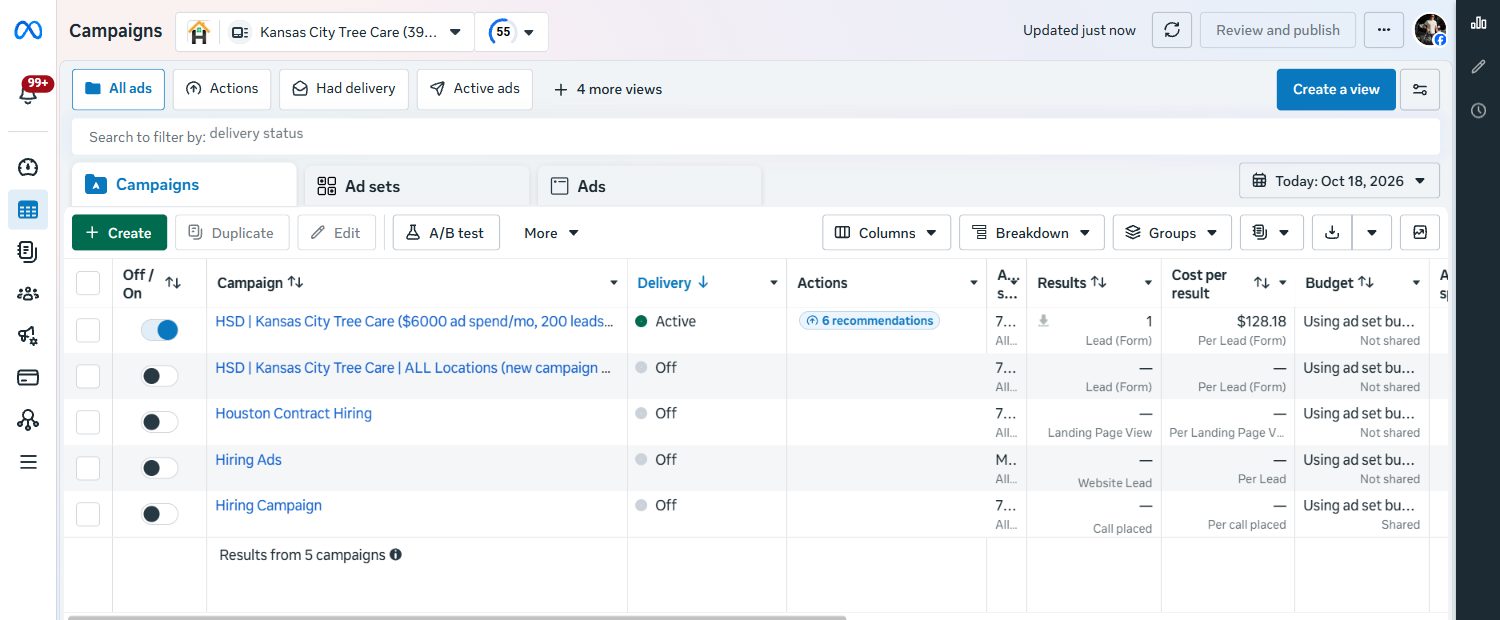
- Ads pointing at the quiz page: None yet. All 11 active Kansas City ads still use Facebook's own lead forms (checked today)
- Meta pixel on the Google landing page: Not there. Checked lp.kctreecareks.net today: Google Ads tag and GoHighLevel call tracking only
- Retargeting campaign: Not running for any client
- Organic boost campaign: Not running for any client
Setting up a new client
The order we build things in, so every piece is ready before the one that needs it. Each step links to its setup guide.
Accounts and logins
Their Facebook ad account and page, their Meta pixel, Google Ads under our manager account, their GoHighLevel, and their own Cloudflare account with an API token saved in the root .env.
Their landing pages
The Facebook quiz page and the Google town page, both on their Cloudflare, both sending leads into their GoHighLevel. The pixel goes on both before any ad points at them.
The ads
Their own videos cut into ads, or AI videos when they have none. Every angle written up front, as a video and an image.
Campaigns 2 and 3: retargeting and organic
The five retargeting audiences built from the pixel and the page, and a small boost behind their organic posts. These fill up from week one, so they can launch once there are people in them.
Follow-up, reviews and reporting
The texts and follow-ups switched on, the review machine on, and their Client Command report live so they can see every lead.
Three campaigns that feed each other
Campaign 1 brings new leads now. Campaigns 2 and 3 make the whole town know the client's name, so the next storm call goes to them.
| Campaign | Goal | Who sees it | What runs |
|---|---|---|---|
| 1. New leads | Leads: forms and calls | Homeowners in the service area who have never heard of the client. Poverty areas, renters and schools cut out | Every angle: owner story, storm, big crane. One ad set per angle so we see which one pays |
| 2. Retargeting | Leads | People who already raised a hand: page visitors from Facebook and Google, ad viewers, followers, video watchers, past customers | Proof, reviews and the offer. In full → |
| 3. Their organic content | Views | Local people in the service area | Posts and reels the client already made, with a small budget. In full → |
How the filter works
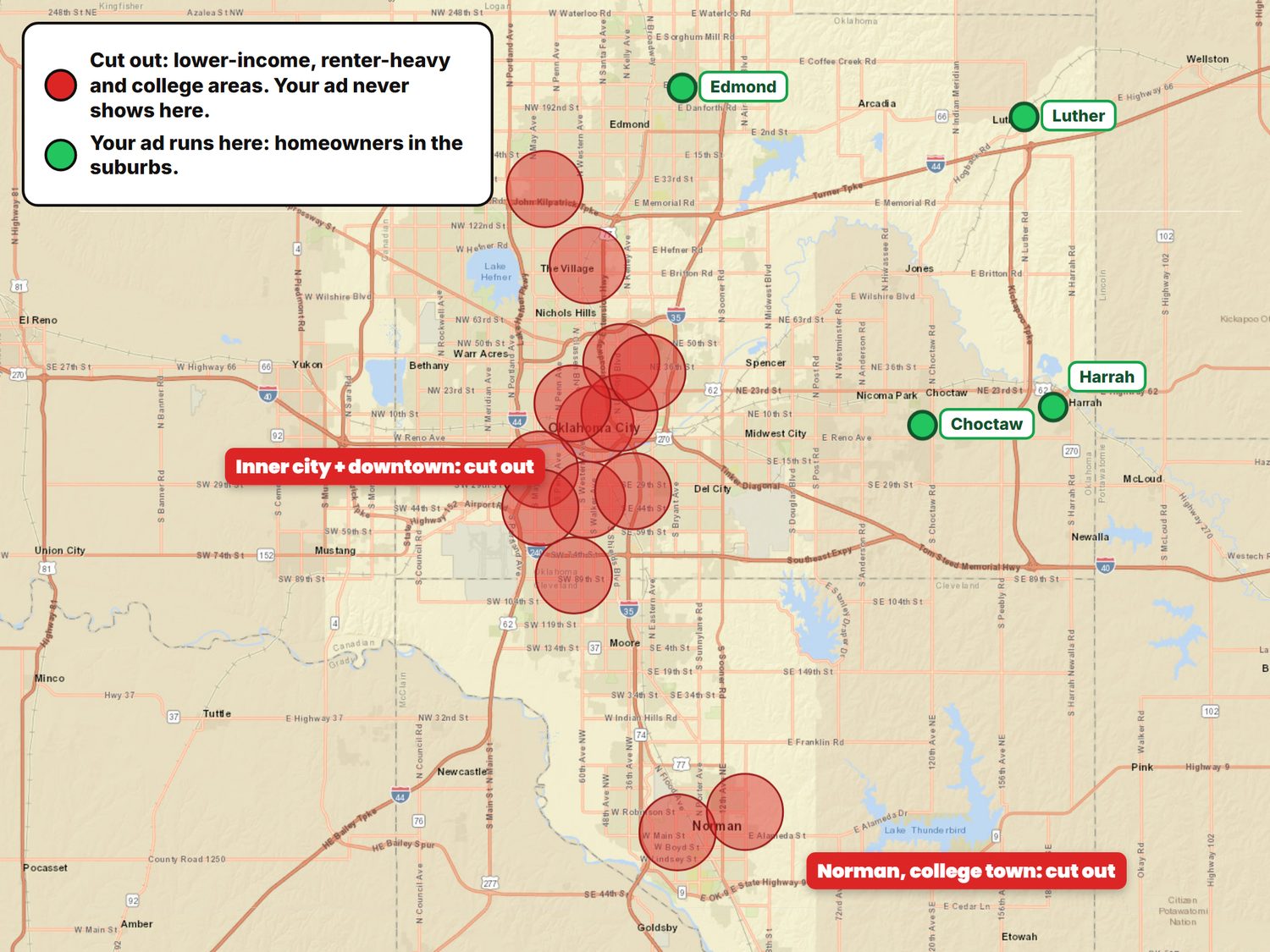
- We draw the service area on the map
- Then cut out the ZIP codes that bring junk: poverty areas, renter-heavy blocks, schools and college areas
- What is left is homeowners in the suburbs, the people who pay for tree work
- Same filter on every campaign, so retargeting never pays for the areas we cut
Set up today, and not yet
Set up today
- Campaign 1, new leads, with the filter: Running for clients
- Campaign 2, retargeting: Not running for any client
- Campaign 3, organic boost: Not running for any client
Their own landing pages
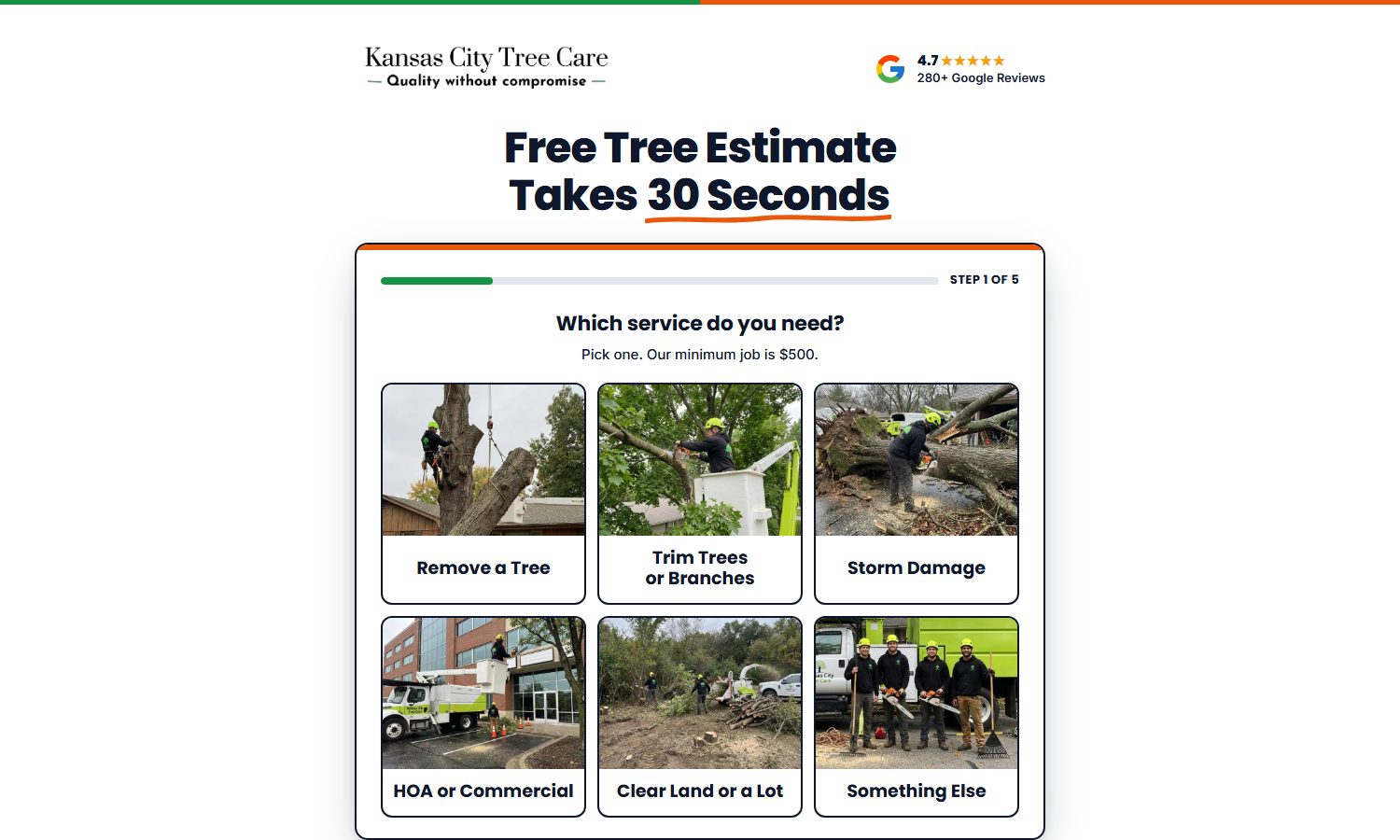
A page asks the questions before the phone rings, so the client gets fewer junk leads and more real estimates. And every visitor gets tagged by the pixel, even the ones who leave.
The Facebook landing page: quote.kctreecareks.net/
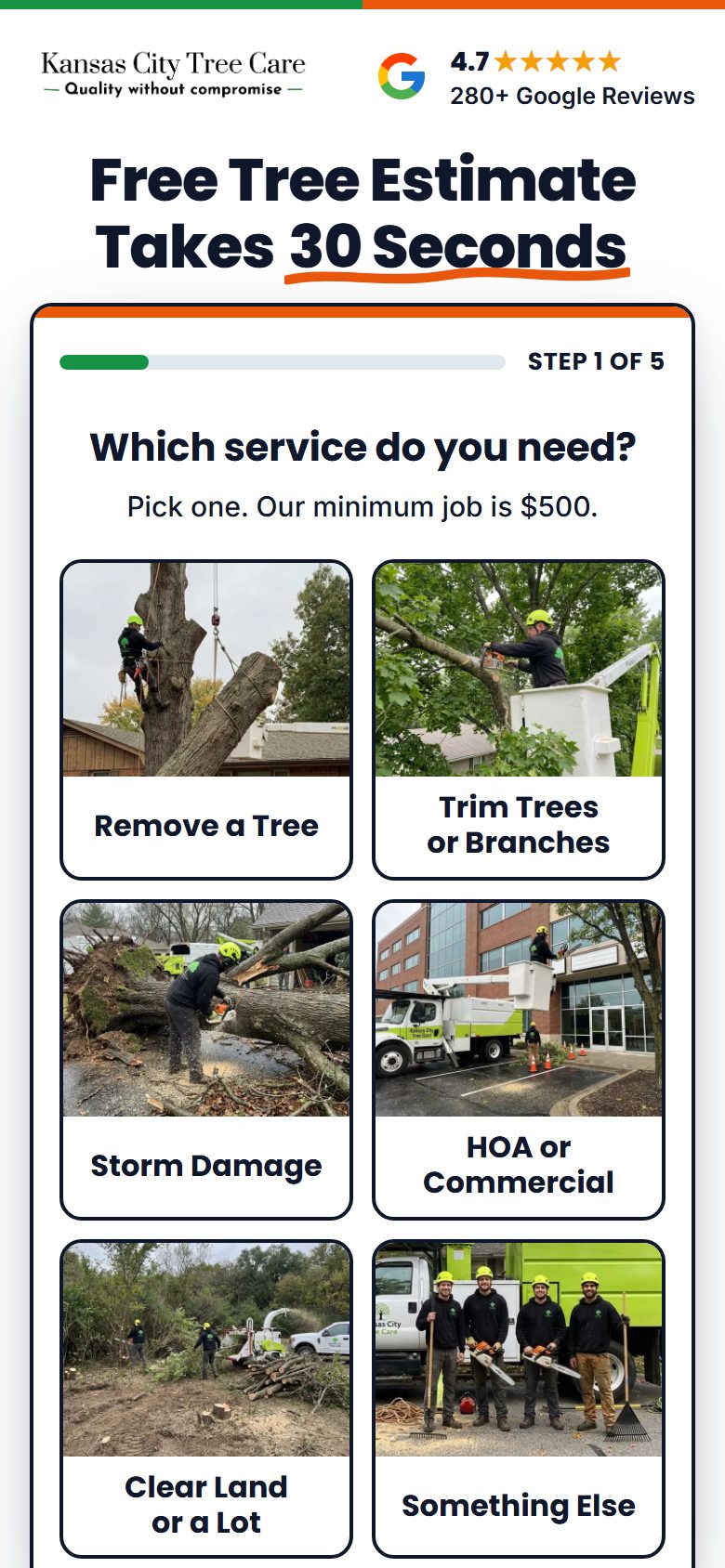
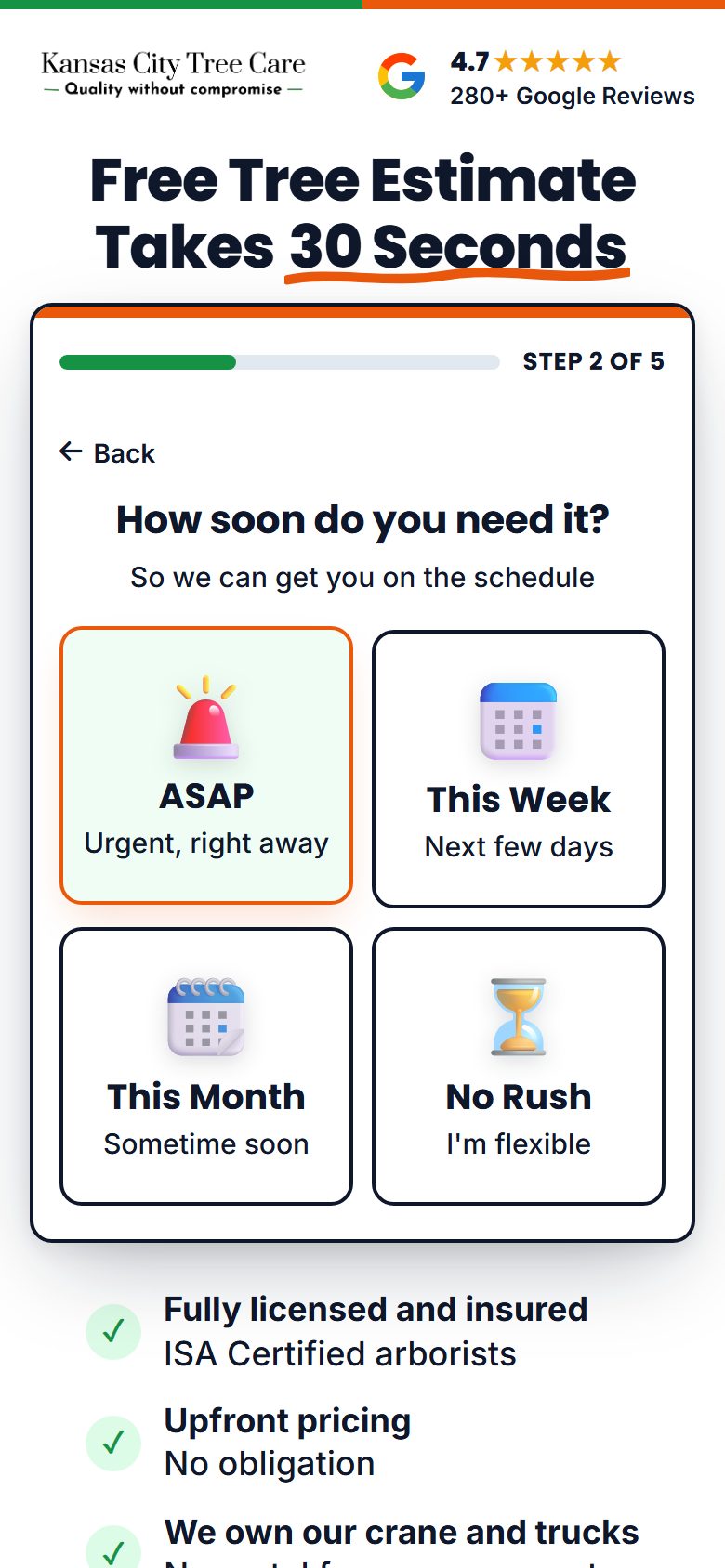
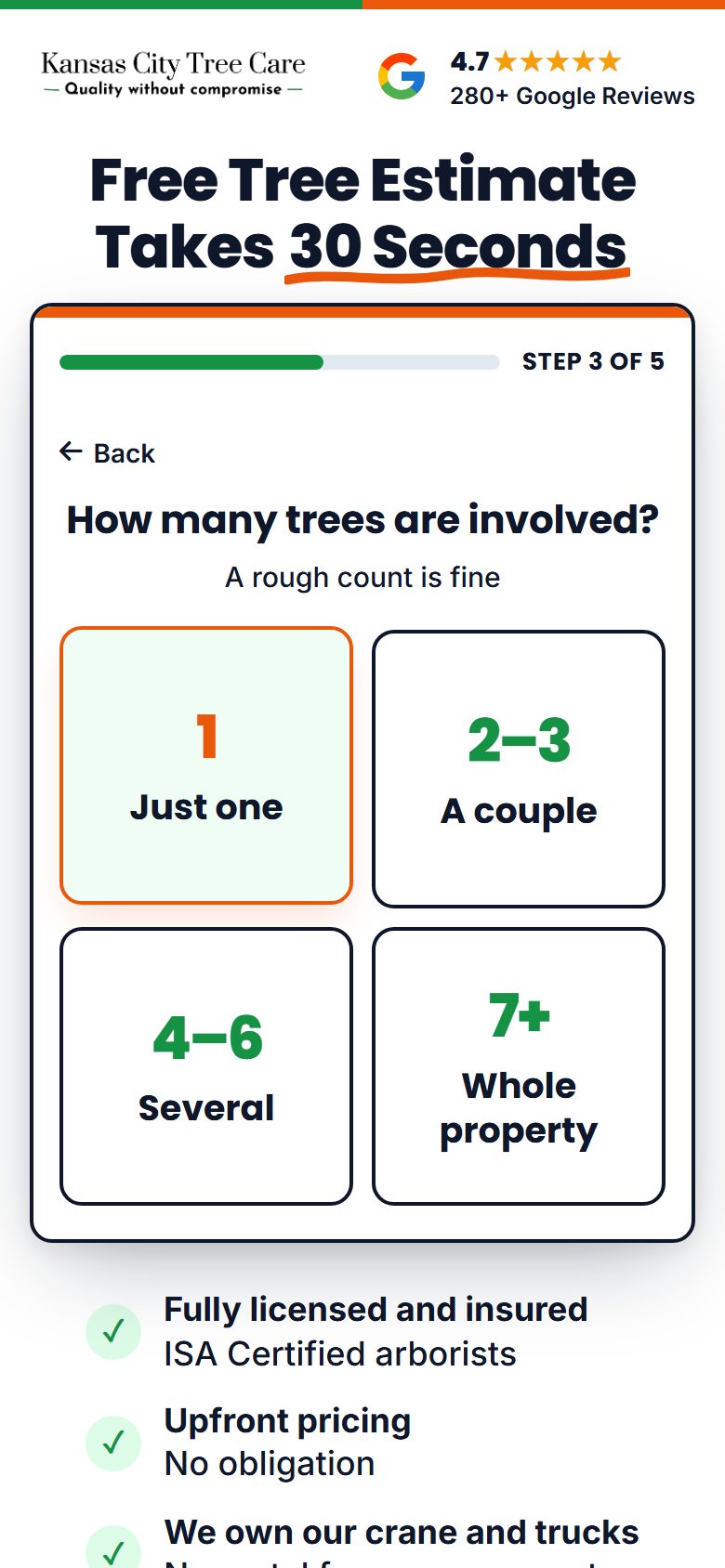
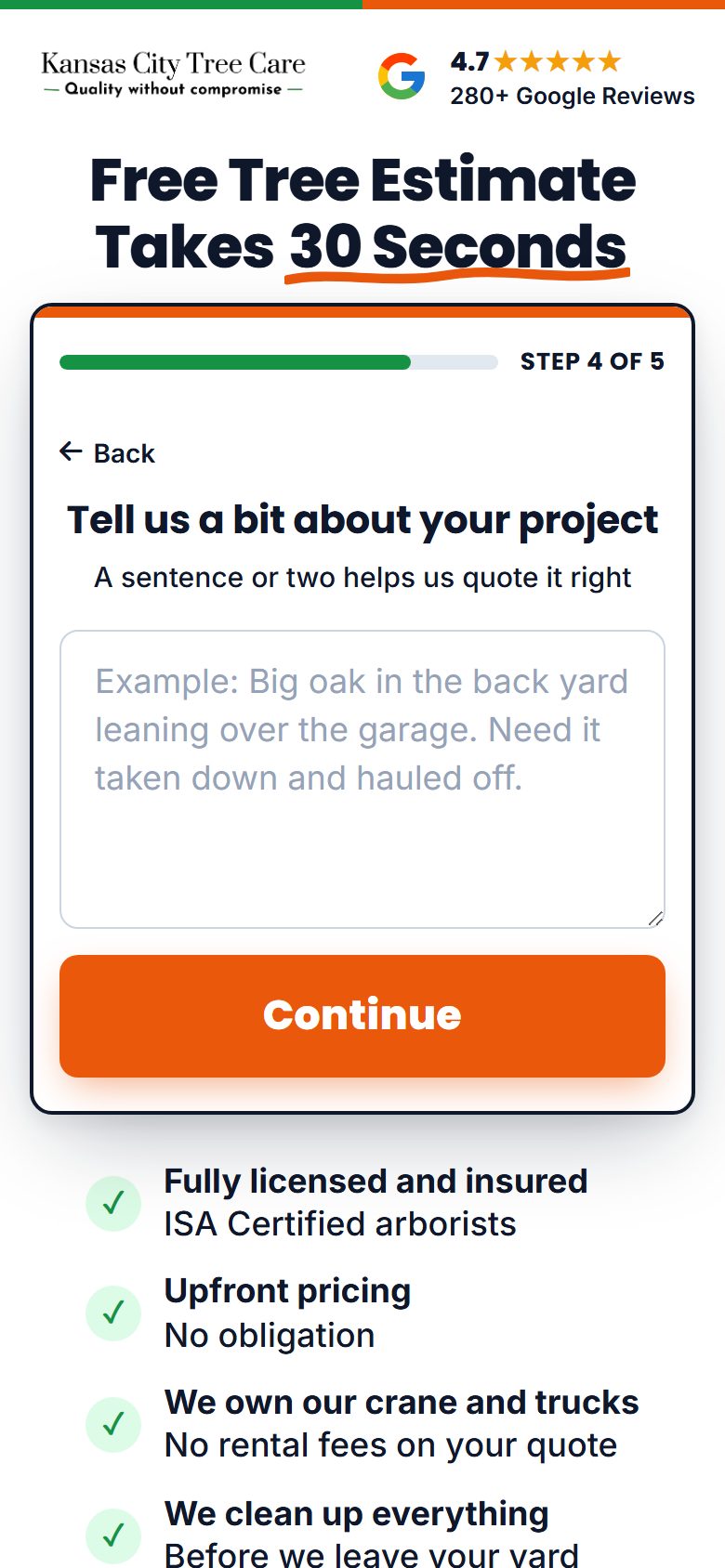
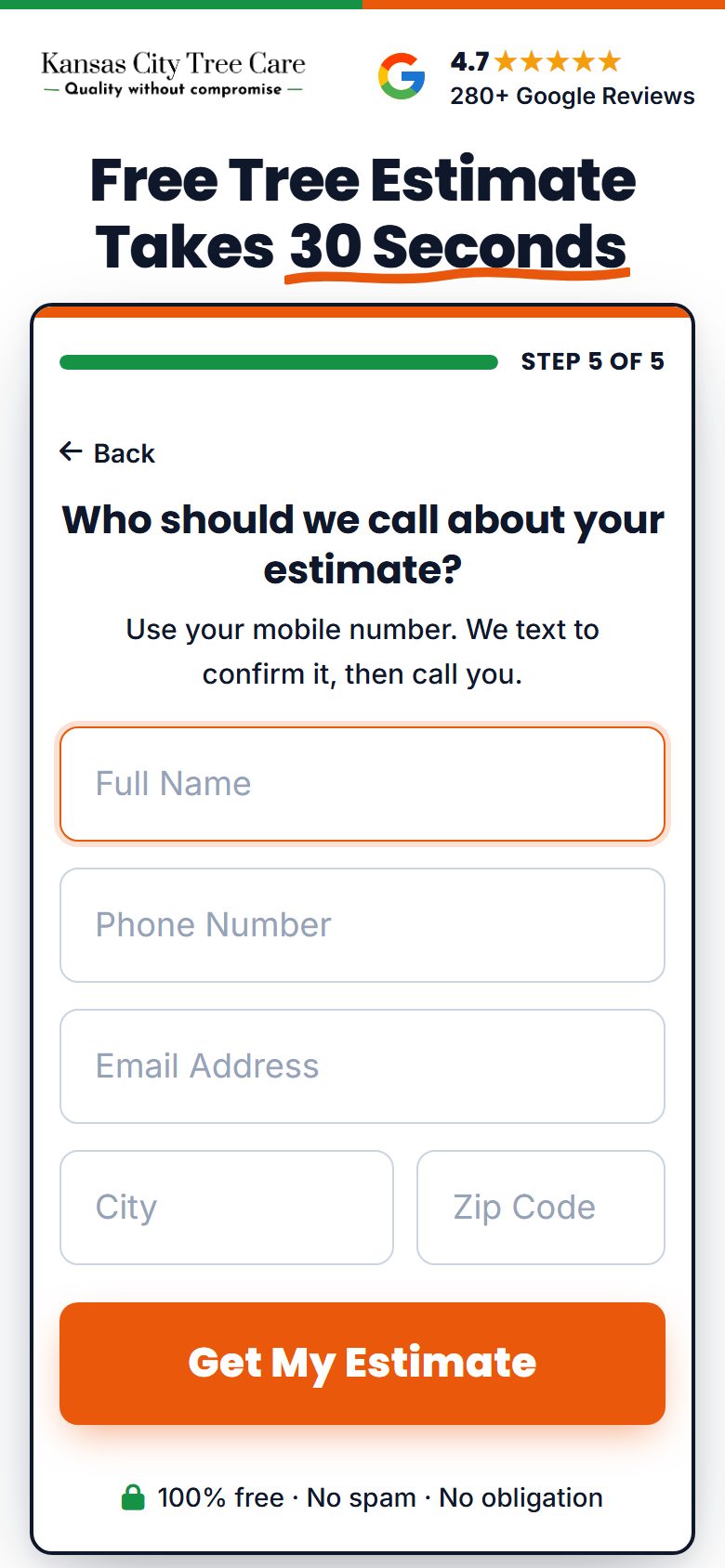
Kansas City Tree Care is the only client with a Facebook landing page. It is the one we are testing: once it proves out, every client gets one built the same way. It asks the same five things as their Facebook lead form, so the page and the form can be compared fairly. How it is built and how to make one: the setup guide.
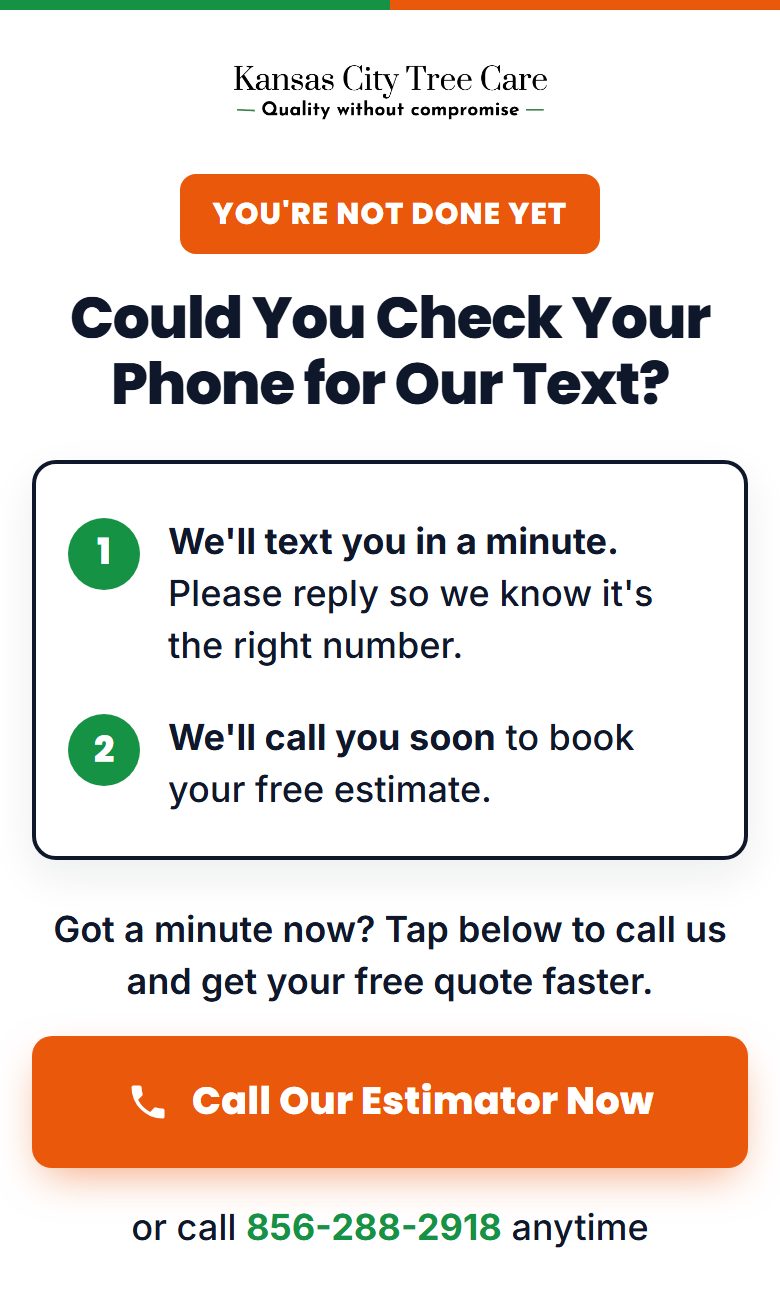
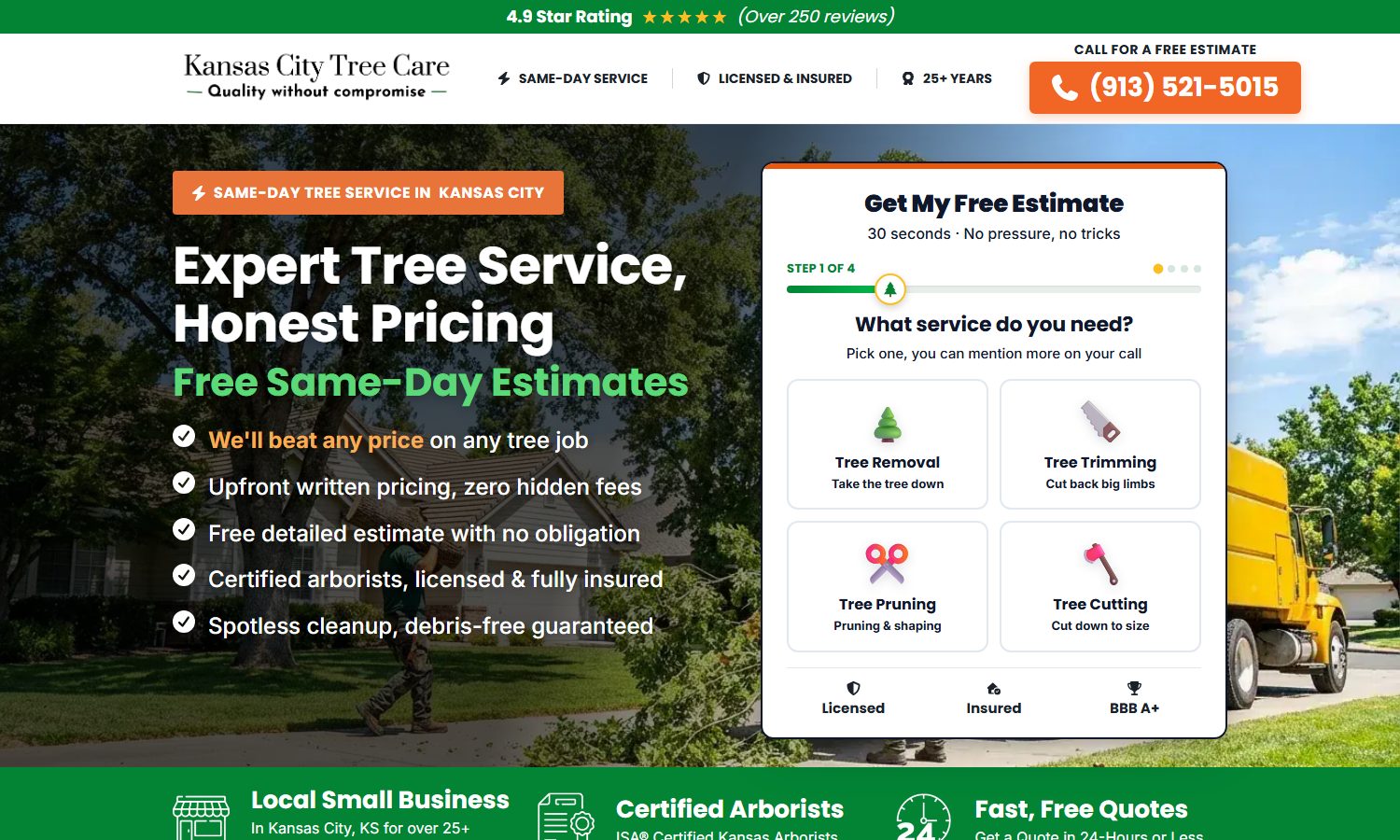
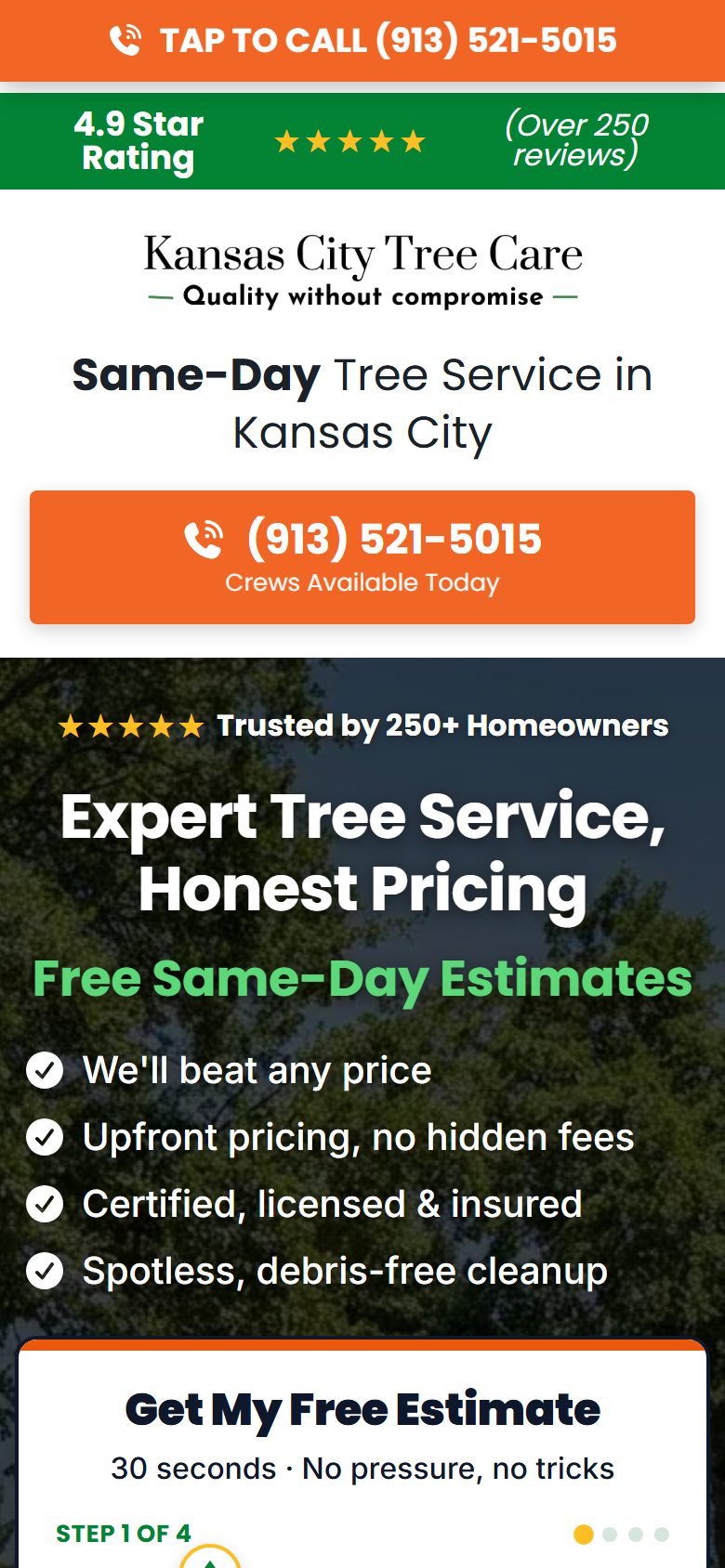
The Google landing page: lp.kctreecareks.net/?geo=Kansas-City
Built for search: the town name changes to match what they searched (?geo=Overland-Park and so on). The setup guide.
Set up today, and not yet
Set up today
- Facebook quiz page: Kansas City only, live at quote.kctreecareks.net, with the pixel
- Google town page: Kansas City, live at lp.kctreecareks.net
- Ads sending people to the quiz page: None yet: all active Kansas City ads still use Facebook's own lead forms
- Every other client: Still on Facebook's own lead form until the Kansas City test proves out
- Meta pixel on the Google page: Not installed
Video ads, from week one
A homeowner sees the real crew before they call: their trucks, their crane, their face. That is what gets the bigger jobs.
They have video: we run their videos as ads
- We take the videos they already post on Facebook and Instagram
- We add the hook, captions and the offer, and run them as ads
- They film nothing new
- It is their real crew and real jobs, so people trust it
No video: we make AI videos
How we make them
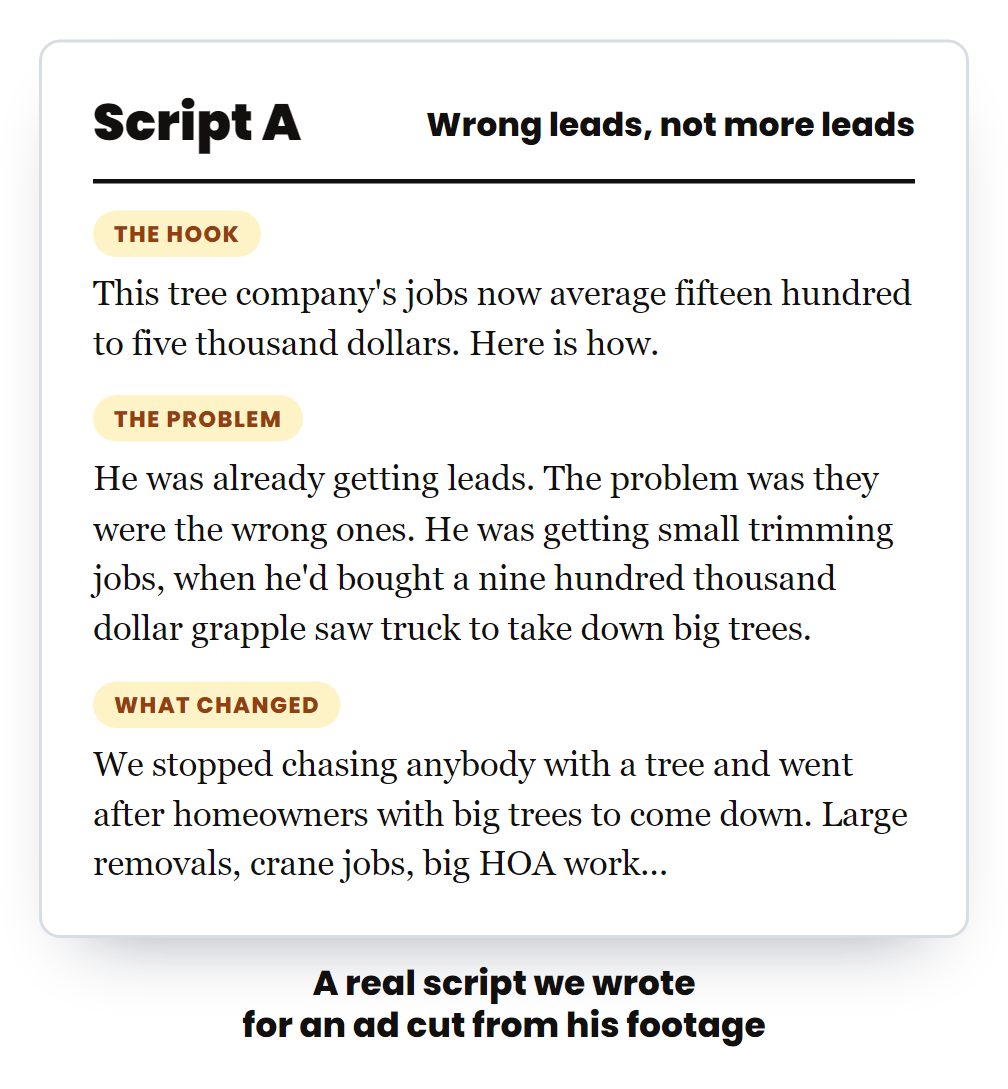
- Script: hook, problem, proof, offer. One per county
- Voice: the owner on camera for 8 seconds, or a voiceover with no face
- Footage: a photo that looks like a real phone photo, then one 4-second clip from it, built from their real trucks and town
- Edit: cut to the script, captions on, the offer at the end, 4:5 for the feed
- Check: judged against their real footage. If it looks fake it does not ship
- Client Studio: the finished ad goes into hsd-client-studio and the ads team uploads it
Set up today, and not yet
Set up today
- Video ads: Made for 6 clients so far, all in Client Studio
- Video for every client in month 1: Most clients still run image ads
Every angle, one ad set each
Ads that say something different each time, and a record of which angle paid.
Angles running or made right now
- Storm danger: "that big tree over your house"
- Bigger jobs: the big crane
- Owner story: real equipment, no rental fees
- Commercial jobs
- Dangerous tree, two questions (Florida, one cut per county)
- Tree problem, paying too much, most affordable (Texas)
| Kansas City, last 30 days, image ads by angle | Spend | Leads | Per lead |
|---|---|---|---|
| The 4-photo grid | $2,146 | 64 | $34 |
| Owner story: big tree removal, no rental fees | $700 | 18 | $39 |
| Bigger jobs: the big crane | $540 | 13 | $42 |
| Owner story: real equipment (newest) | $384 | 7 | $55 |
From Meta, active ads, last 30 days, pulled Oct 12. This is how we read which angle pays.
Set up today, and not yet
Set up today
- A few proven angles per client: Mostly as images
- Every angle written up front, as video and image: With a note each month on what won
Google Ads, and how it links to Facebook
Search ads written for their town, their own landing page where the town changes to match the search, the junk searches blocked, and every lead followed up. Built on $4.9 million of Google Ads for tree companies across 68 accounts.
Search ads written for their town
- Their town in the headline
- Free estimate, licensed and insured, their reviews
- Many headlines tested, the winners kept
- Performance Max where it works
We block the junk searches
- 500+ words blocked on one account
- "Jobs", "free", "used", "sale" and "pictures" never show their ad
- Their money goes to homeowners, not job seekers
Their Google landing page
- The town name changes to match the search
- A 4-step estimate form that filters the junk
- Calls tracked: each visitor sees a number from a GoHighLevel number pool, so the call is tied to the ad
- Forms go straight into their GoHighLevel as a Google lead
The link to Facebook
- The Meta pixel goes on this page
- Everyone who clicks a Google ad and does not call joins Facebook retargeting audience 2
- They then see the client's crew, reviews and offer on Facebook and Instagram
- Google pays for the click once; Facebook keeps them warm for cents
Every lead followed up
- A text right away after every form
- Calls and texts in one app, from their business number
- Follow-ups until they answer
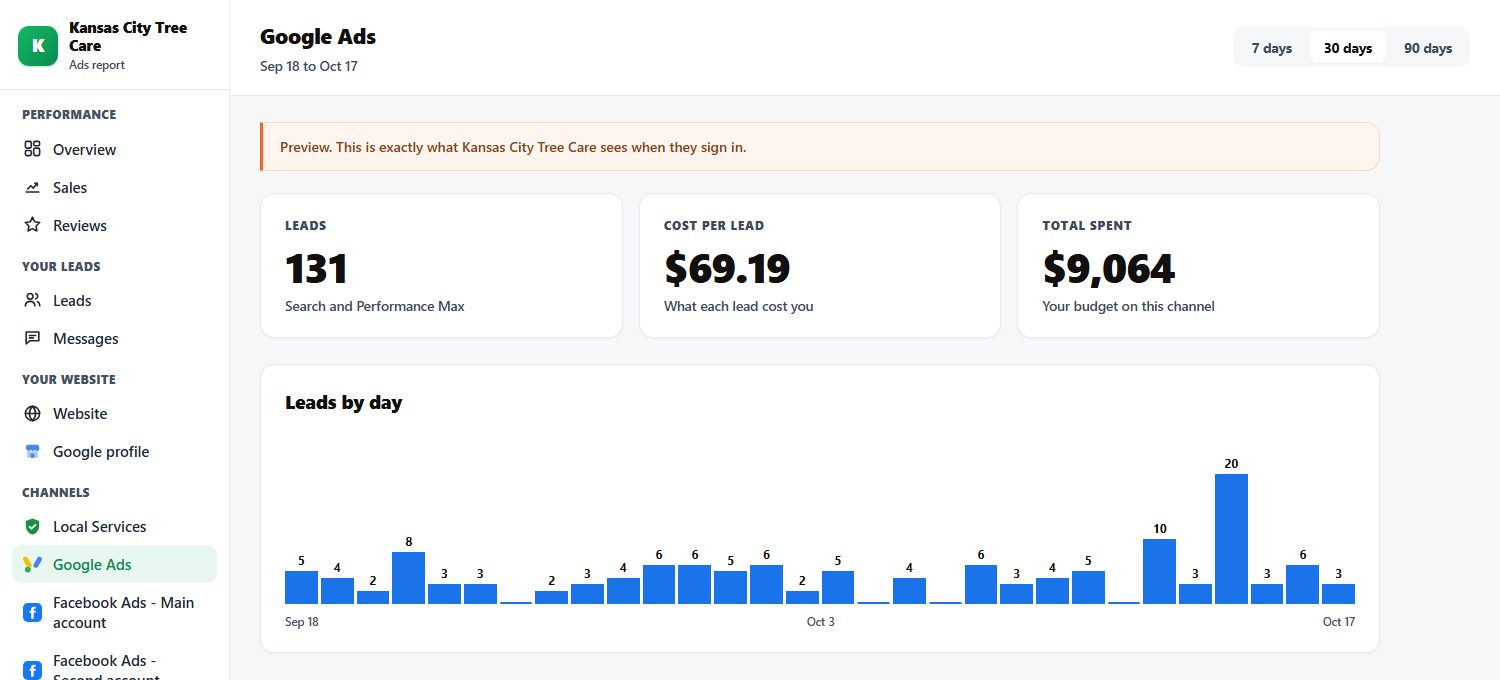
- Google gets its own page in their Client Command report
How the page is hosted and how to build one: the setup guide.
Set up today, and not yet
Set up today
- Search ads, negatives, the town landing page: Running for Kansas City
- Call tracking and form to GoHighLevel on the Google page: Live on lp.kctreecareks.net
- Meta pixel on the Google landing page: Not installed. Checked today: the page loads Google Tag Manager (GTM-K7DMTKSJ) with the Google Ads tag only
- Google visitors retargeted on Facebook: Waiting on the pixel
Retargeting: bring them back
It goes back to people who already raised a hand and did not call. Cheap to run because the groups are small, and they see proof and the offer, not the first ad again.
Most homeowners do not call the first time. Retargeting is how the client gets that job a week later instead of the next company.
The five audiences
| Audience | Who is in it | Built from | Seen the offer? | What they see |
|---|---|---|---|---|
| 1. Their landing page visitors | Everyone who visited the Facebook landing page or their website and did not call | The Meta pixel | Yes | Reviews, a real job, the offer again, back to their page |
| 2. Their Google Ads visitors | Everyone who clicked a Google ad, landed on the Google landing page and did not call | The Meta pixel on the Google page | Yes | Same as audience 1 |
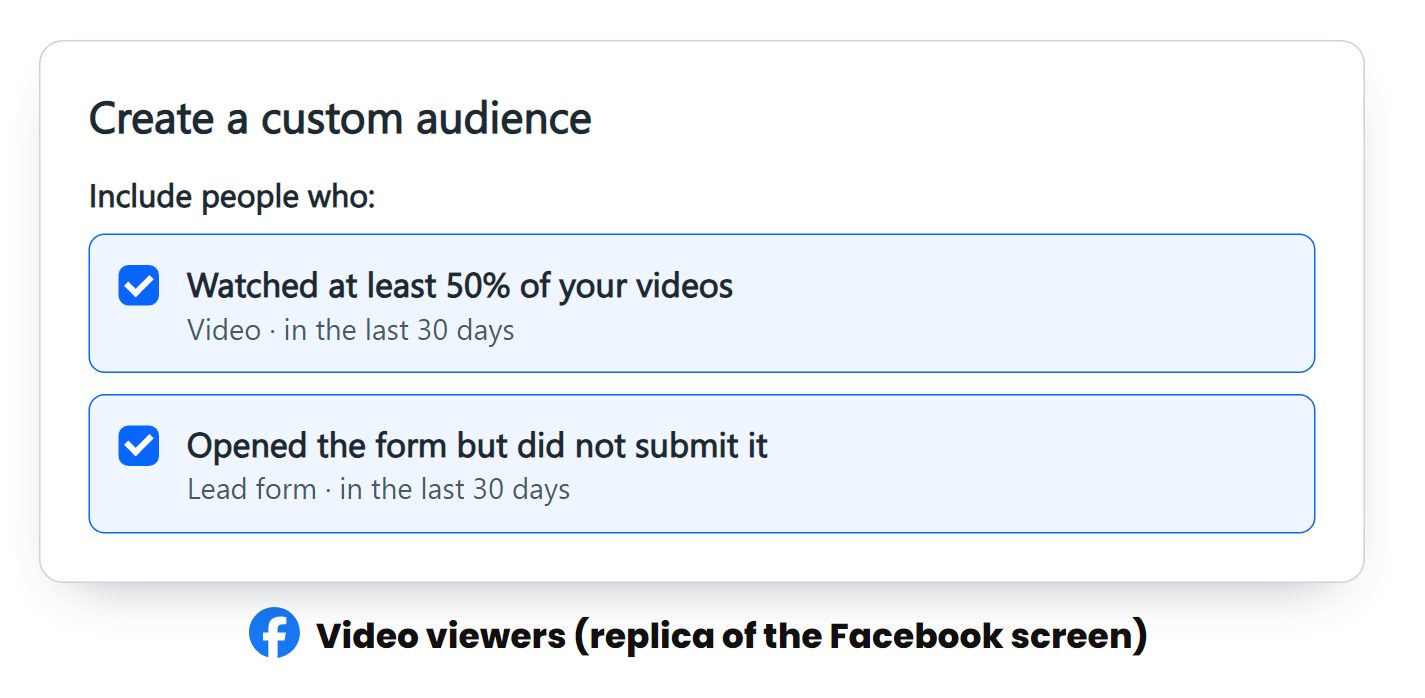
| 3. Their Facebook ad viewers | Watched half a video ad, or opened the lead form and did not finish | Facebook engagement | Yes | Proof and the offer, a different ad from the one they saw |
| 4. Their followers and video watchers | Everyone who follows or engages with their Facebook and Instagram, and everyone who watched their boosted posts | Page and video engagement | Not always | The offer itself: the owner or crew on camera, a real job, then the offer and the page |
| 5. Past customers | Their customer list, if they have one | A list upload | They know the company | "We are in your area this week", seasonal work, a review ask |
To switch it on for a client
- Install the Meta pixel on the Facebook landing page and the Google landing page, and check it fires (pixel guide)
- Build the five audiences in their ad account (30 to 180 days), with the same ZIP filter
- Make the ads: reviews, a real job, the owner on camera, the offer
- Launch once the audiences have people in them
Set up today, and not yet
Set up today
- Pixel on the Kansas City quiz page: Live, but no ads send people there yet, so audience 1 is not filling
- Pixel on the Kansas City Google page: Not installed
- The five audiences: Not built for any client
- Retargeting campaign: Not running for any client
Their organic content: a town that knows their name
When a tree comes down, the homeowner already knows who to call, because they have watched that crew work all year.
Boost what they already post
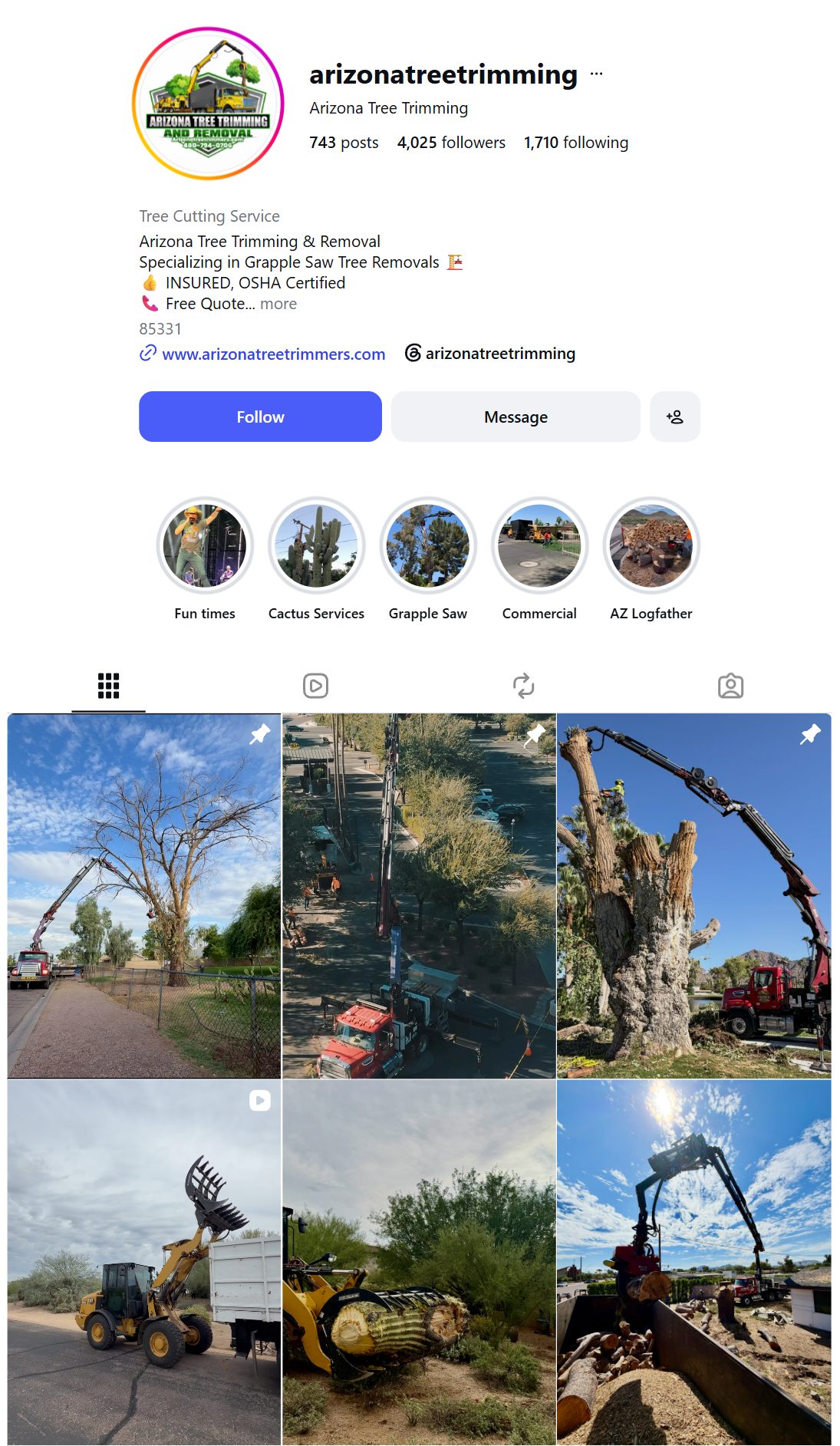
- A small budget behind the posts and reels they already made
- The goal is views, not leads: more local people watching their work
- Everyone who watches joins retargeting audience 4
- Then they see the offer, from a crew they already recognize
When they want us to post for them
- They send us their photos and videos
- We turn them into posts and reels and post them
- They never open the app
How we make their posts
The same way we make our own organic content: written for a homeowner scrolling on their phone, not for another tree guy.
Do
- Open on the homeowner's problem in plain English: "Got a big tree in the backyard and no way to get equipment back there?"
- One idea per video, every line easy to understand
- Quick cuts, 4 seconds or less each
- Their real crew, trucks and jobs on screen
- End on what to do next: call, or message for an estimate
- Words a homeowner would not use ("the wrong crew will drop pieces on your roof")
- Hooks that do not fit a homeowner (they do not own equipment)
- Long talking intros
- Anything that looks fake next to their real footage
Set up today, and not yet
Set up today
Nothing yet.
- Organic boost campaign: Not running for any client
- Posting for clients: Not set up
Every lead followed up
The ads only matter if someone gets back to the homeowner fast. The system does it for the client.
What runs in their account
- Every call and form from Facebook, Google and their website lands in GoHighLevel
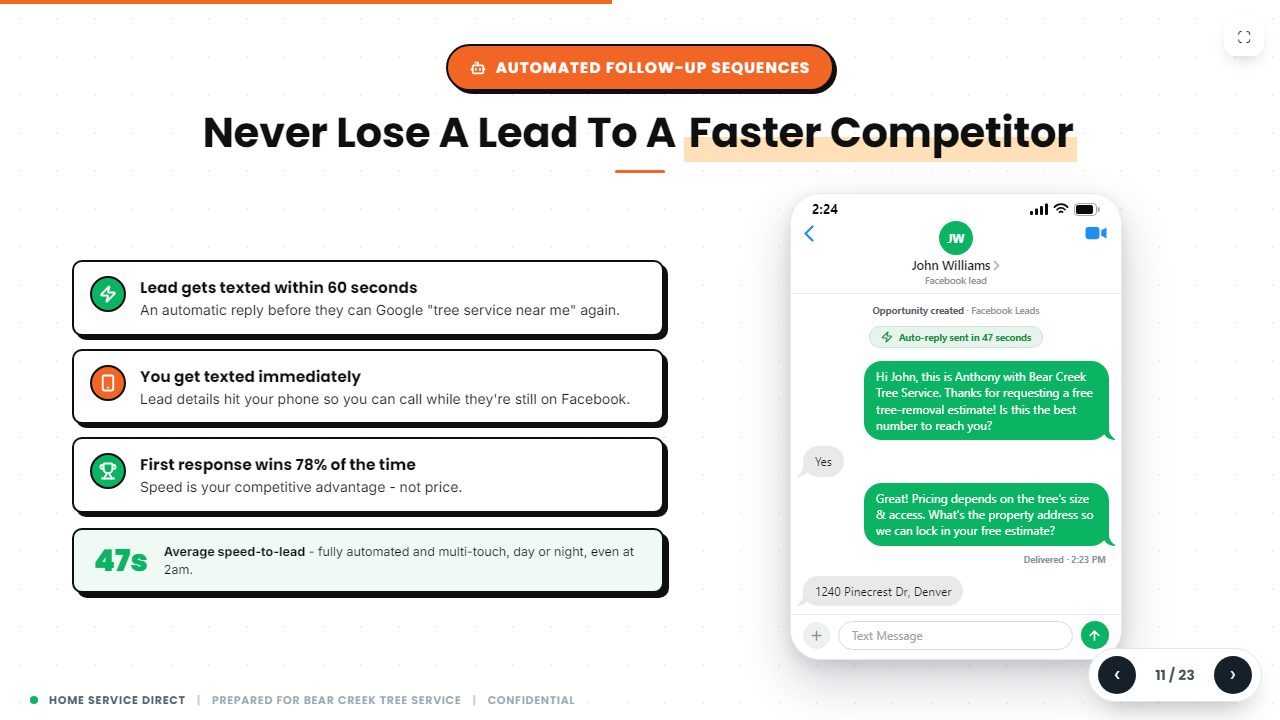
- A Facebook lead gets a text within seconds, with what they asked for
- No reply in about 10 minutes: a second text
- They reply: "our estimator will call you", and a request for photos
- After every job, a review text
- The full setup: GoHighLevel guide and review guide
An account manager
- Sebastian is their person: text or call him any time
- Checks the leads are coming in, are good, and are closing
- Changes towns or budget when they ask
- Spanish if they need it
- Hiring ads for climbers, groundmen and office help, made and run for them
Set up today, and not yet
Set up today
- GoHighLevel texts, follow-ups, review machine: Running for Kansas City
- Account manager and hiring ads: Every client
- Follow-up texts for quiz page leads: Not wired: quiz leads get the tag "fb quiz lead", which the follow-up does not watch yet
The client report: proof down to the job
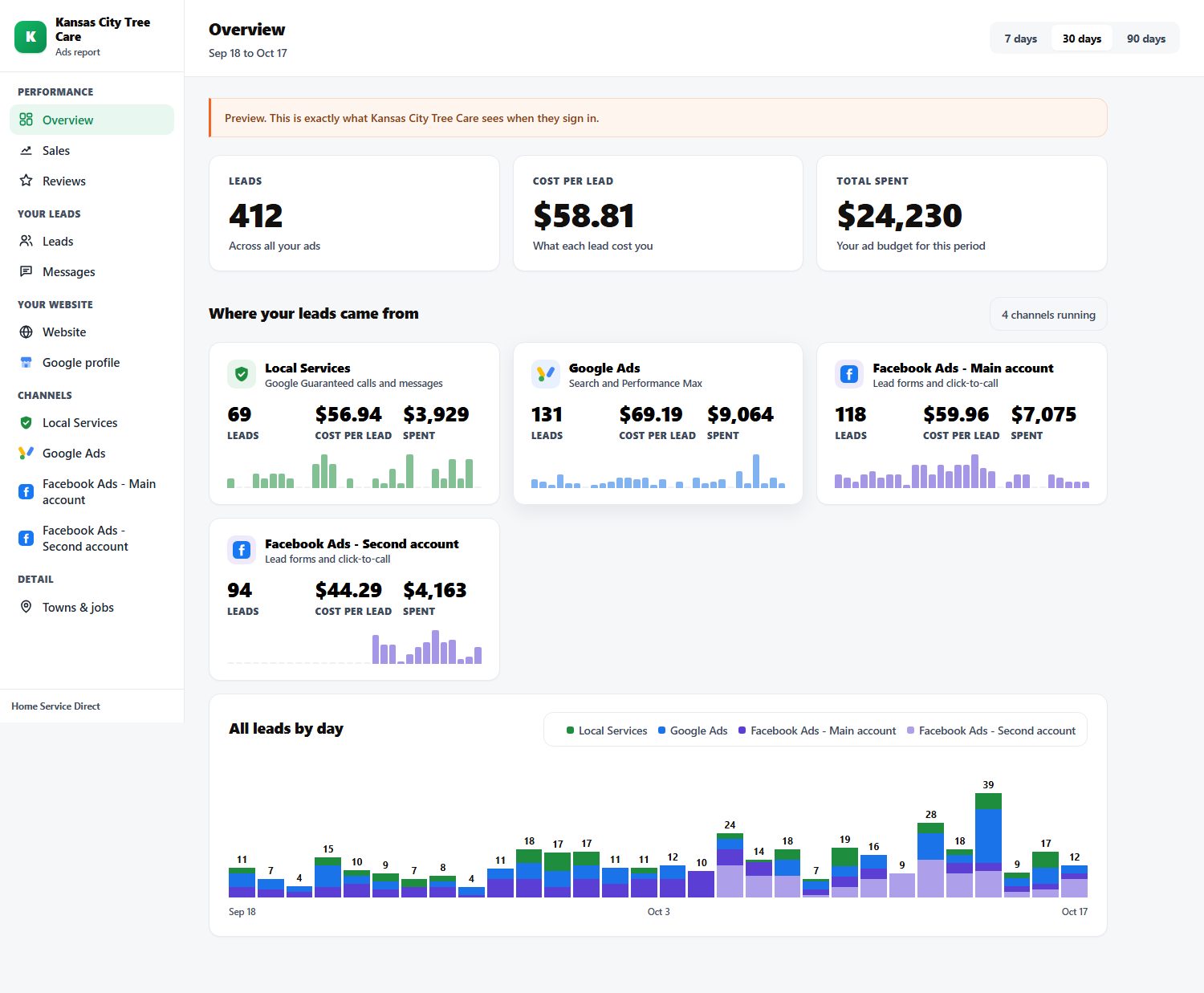
Client Command pulls every channel into one report the client can open on their phone: what was spent, what came in, where every lead stands, and their Google reviews. No spreadsheet, no "trust us".
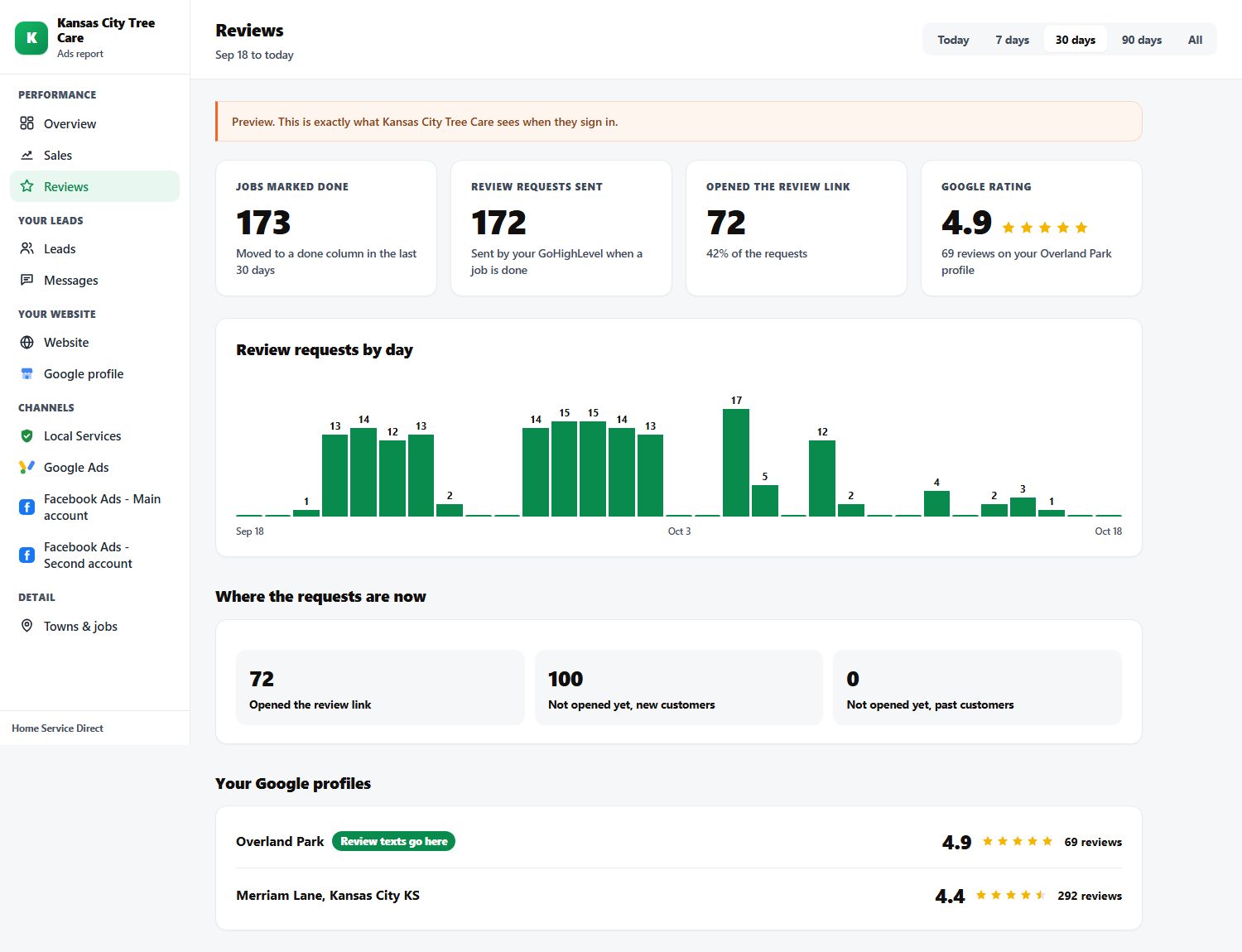
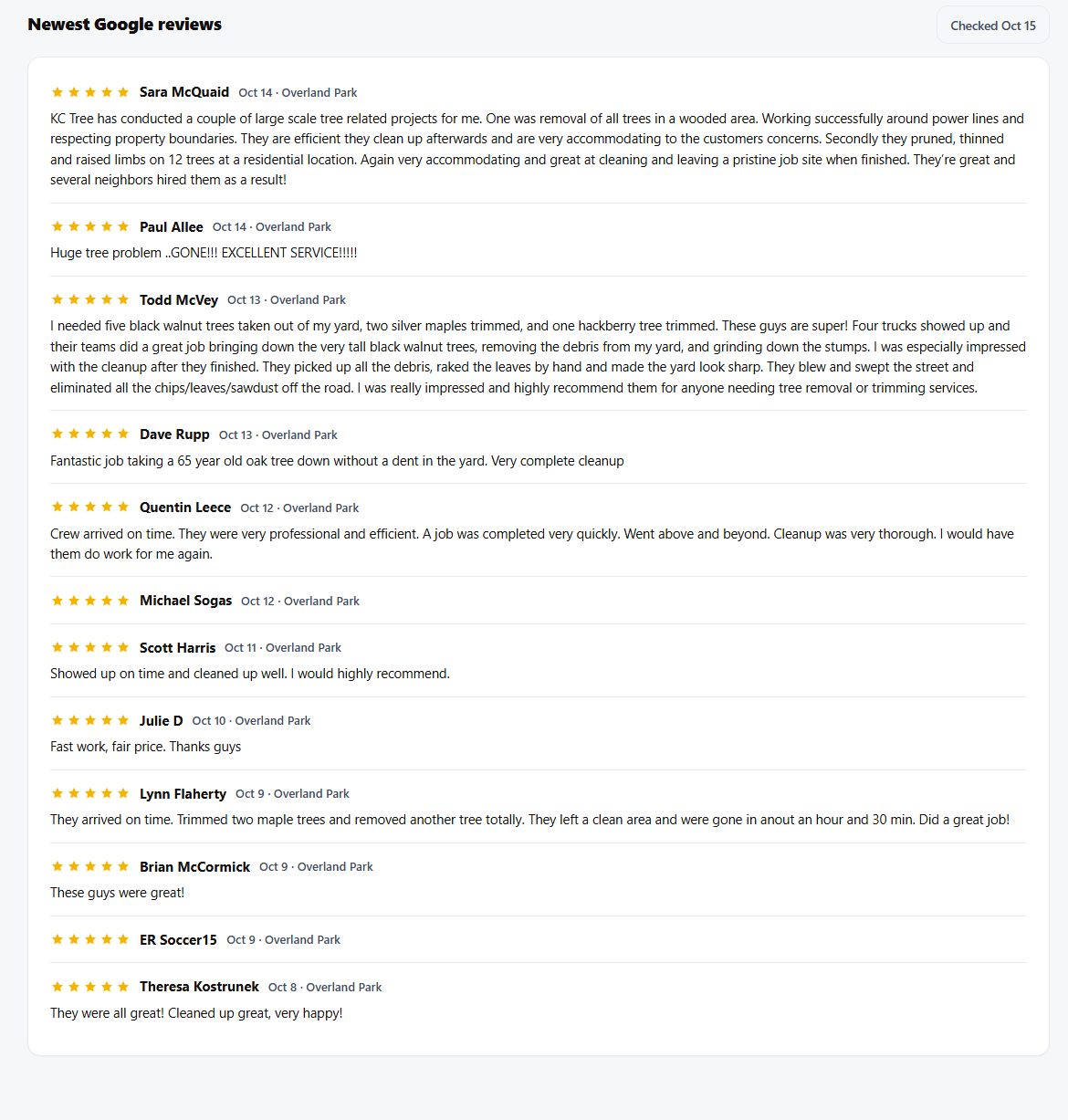
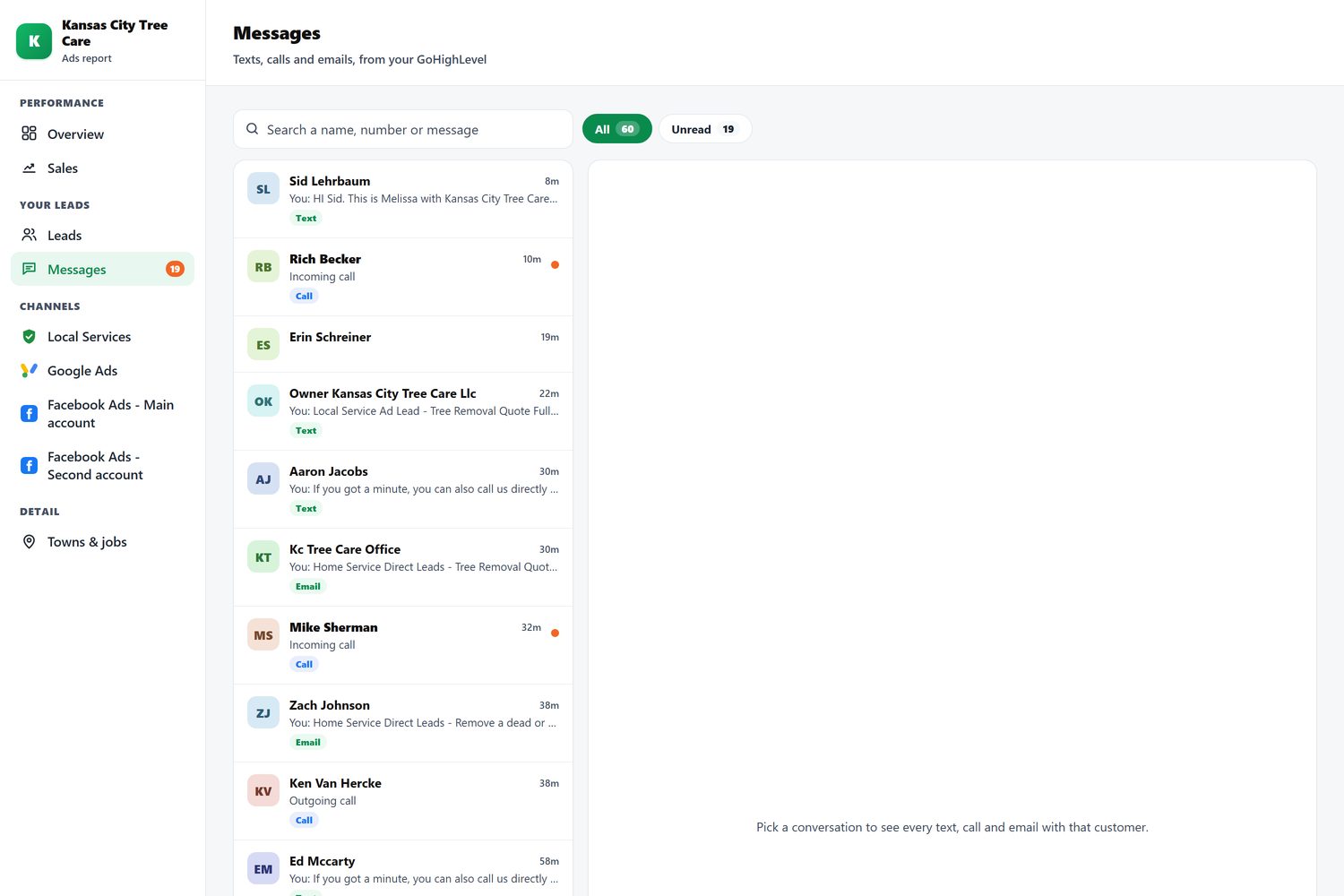
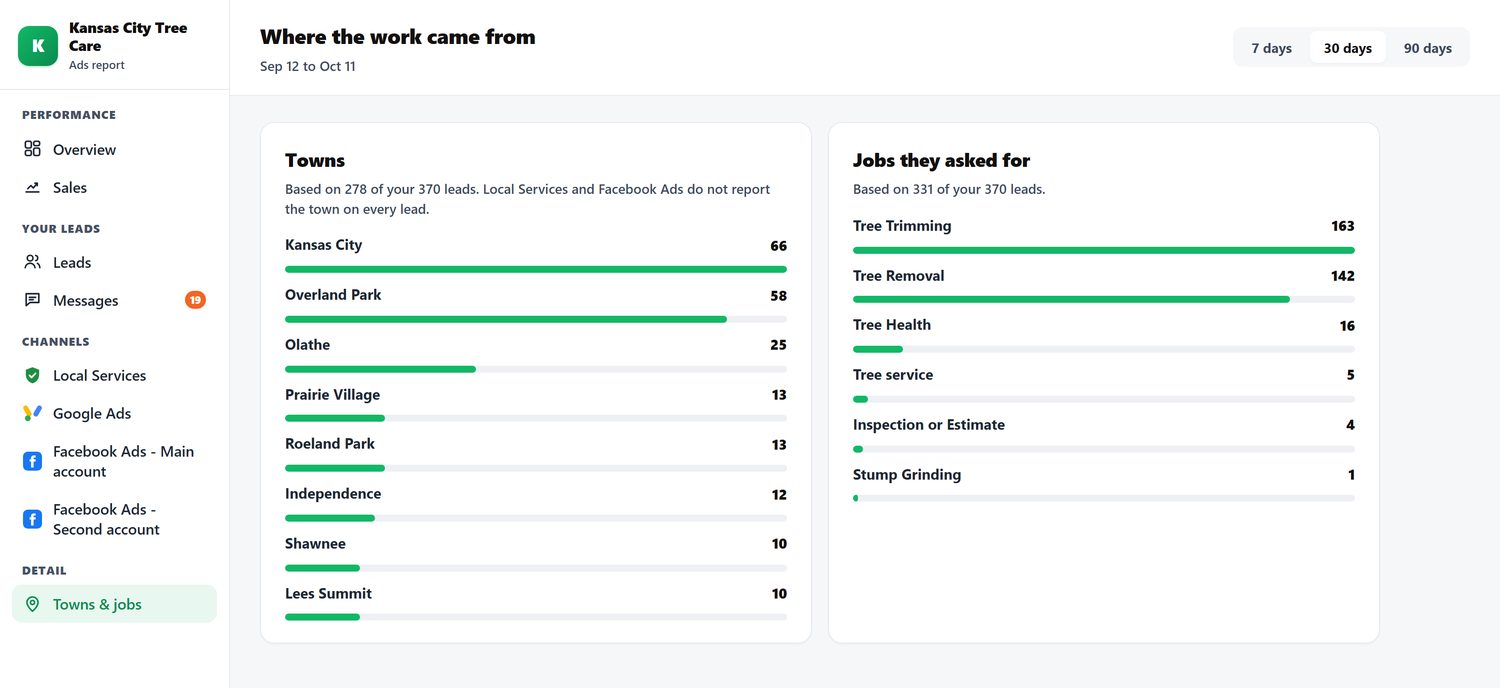
Their Google reviews are in the report now
What is on it
- Overview: leads, cost per lead and spend; one card per channel; every lead by day
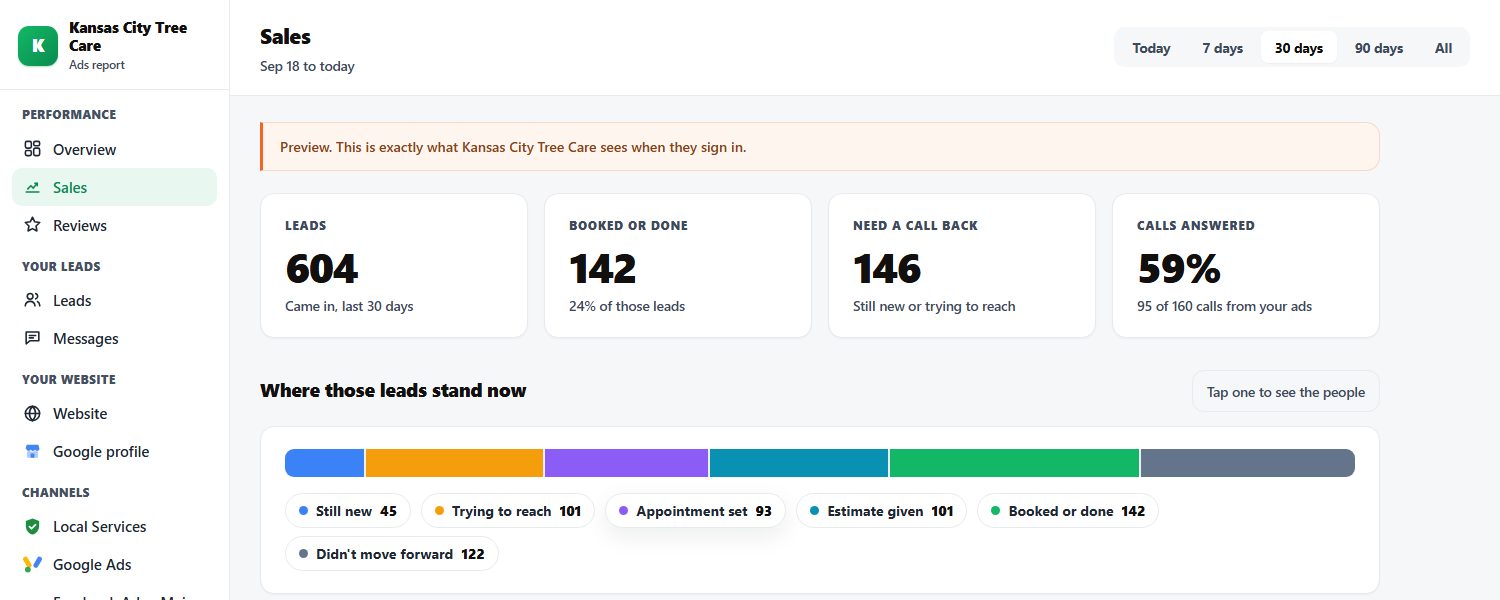
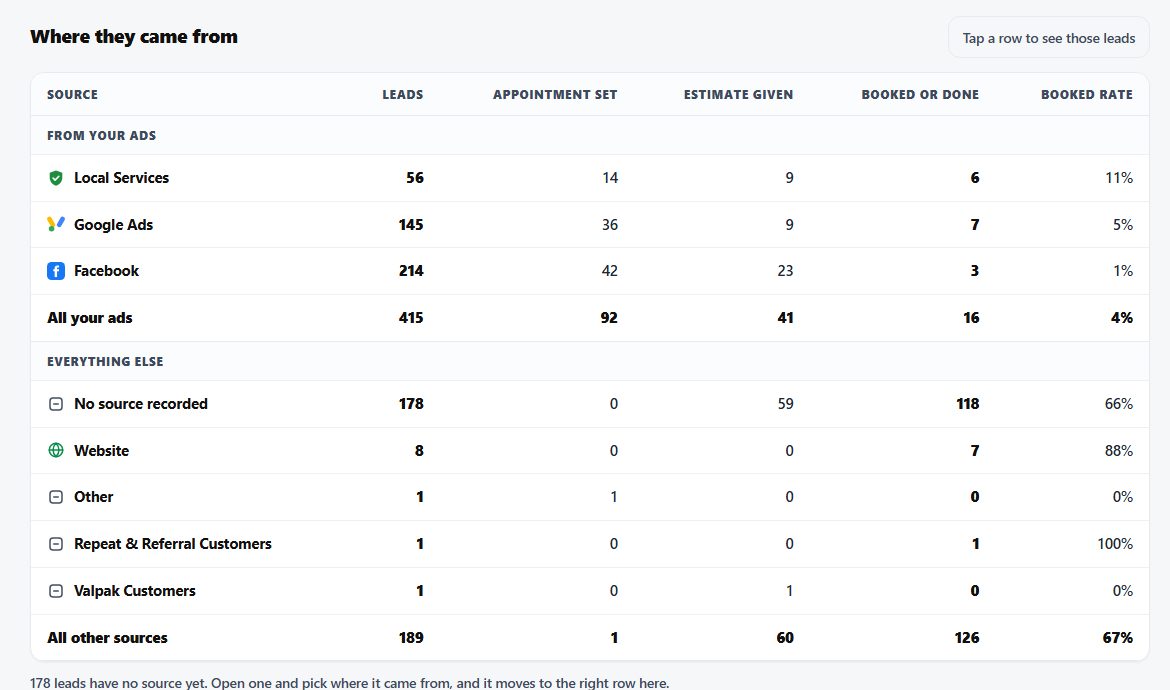
- Sales: where every lead stands, who is waiting on a call back, calls answered, booked rate by source and service
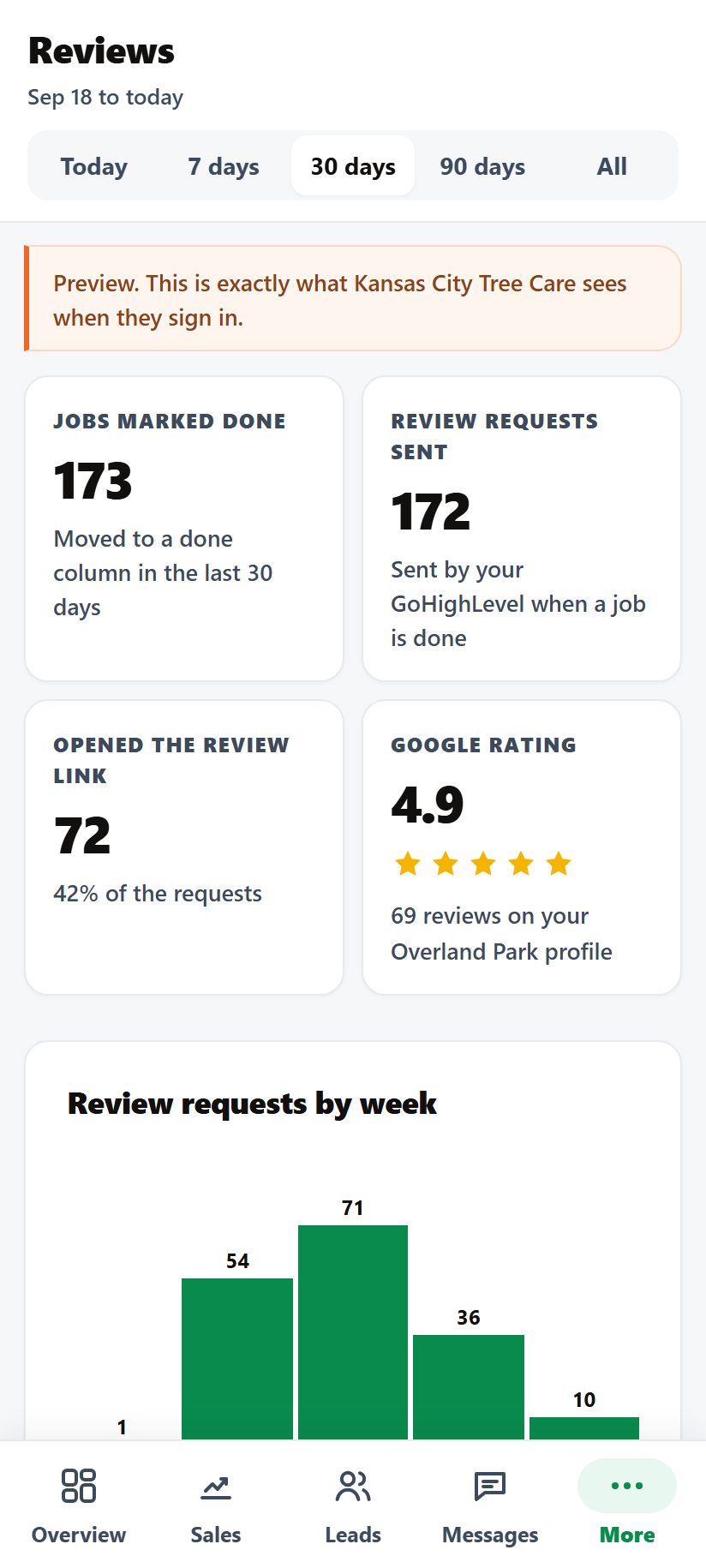
- Reviews: jobs done, review texts sent and opened, their Google rating, newest reviews
- Leads and Messages: one row per lead, and the whole conversation with each customer
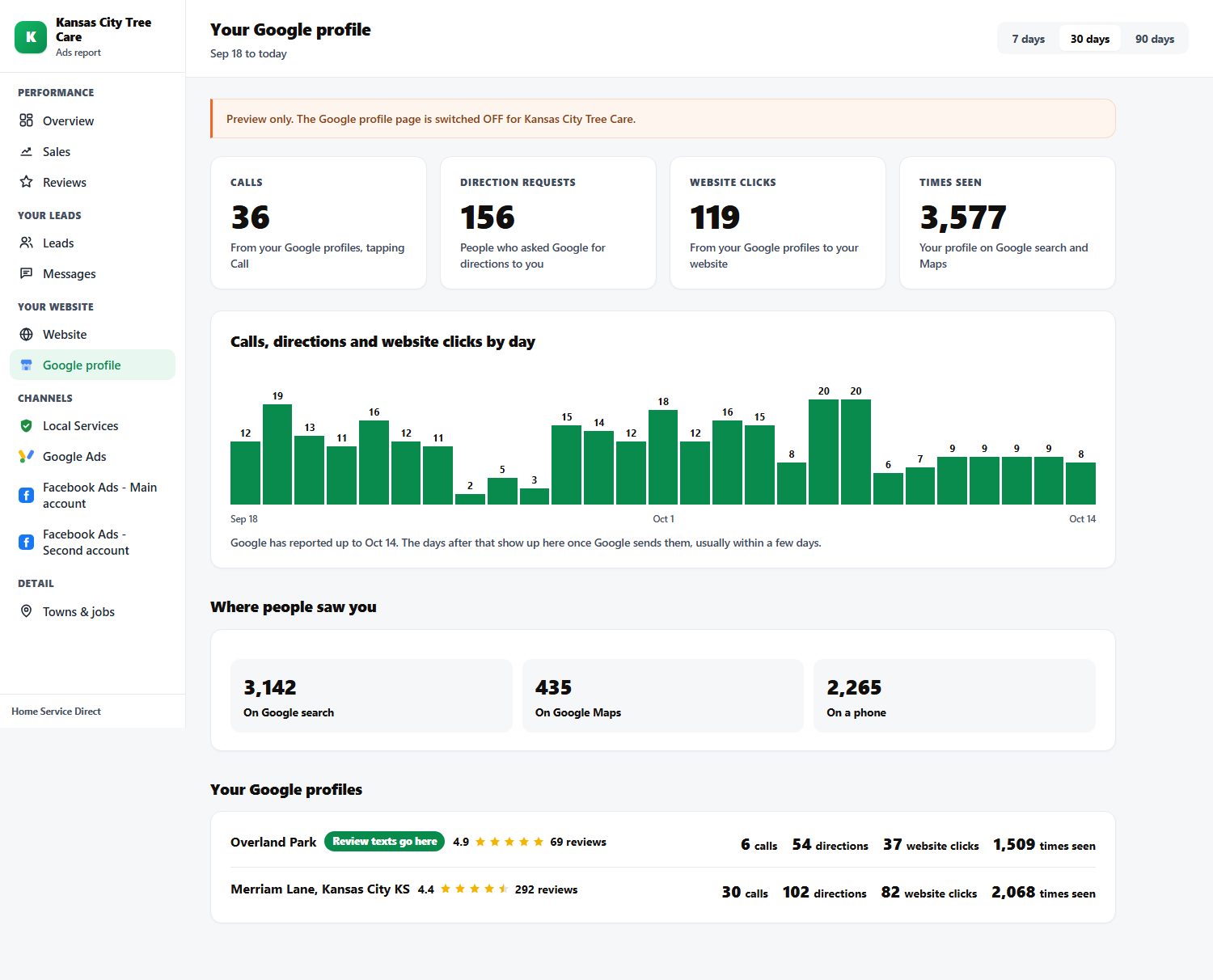
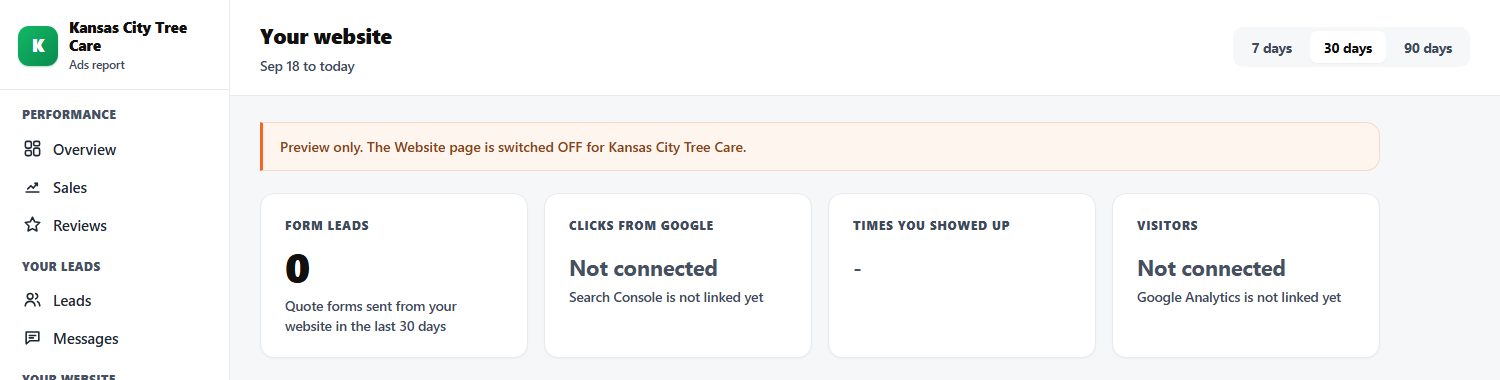
- Website and Google profile: built, switched off for Kansas City for now
- One page per channel: Local Services, Google Ads, each Facebook account
- How to set one up: the setup guide
Set up today, and not yet
Set up today
- Full report: Overview, Sales, Reviews, Leads, Messages, channels: Kansas City Tree Care
- Website and Google profile pages: Built, switched off for Kansas City; their website is not linked to Search Console or Analytics in the report
- Sales, Leads, Messages and Reviews for every client: Built, switched off for the others
Where everything lives
Every piece of Kansas City Tree Care's setup, the link to it, and where it is hosted. Checked Oct 18 through the Cloudflare, GoHighLevel and Meta APIs.
| Piece | Live link | Hosted on | Source and how to deploy |
|---|---|---|---|
| Facebook quiz page | quote.kctreecareks.net/ | KC's own Cloudflare account, Pages project kc-tree-quote | kctc-tree-lp/site/, deploy with bash kctc-tree-lp/_deploy.sh |
| Google town page | lp.kctreecareks.net/?geo=Kansas-City | KC's own Cloudflare: Worker hsd-ab-router in front of Pages kansas-city-lp-v2 (and kansas-city-lp-v1) | Not on David's computer. Last uploaded Oct 15 and 16 by hand; whoever did that has the files |
| Hiring pages | jobs.kctreecareks.net/ | KC's own Cloudflare, Pages kc-tree-jobs | kansas-city-tree-care/hiring-pages/ |
| Old quiz page (do not use) | kctc-tree-lp.pages.dev | The marketing@ client account | The first copy. It still loads and sends leads nowhere |
| Meta pixel | Kansas City Tree Care Pixel, ID 1555581752644418 | Meta Events Manager, HSD business | Added to the quiz page by its Worker |
| Facebook ads | Ad accounts 3970141029893099 (main) and 4300389173551090 (second) | Meta Ads Manager | 11 active ads, all on Facebook lead forms |
| Google Ads | Account 251-330-4550 | Under our manager account | Every running ad points to lp.kctreecareks.net |
| GoHighLevel | Location EAXaHmBUNVfEsMJDkJf2 | Their own GoHighLevel | Private key saved (encrypted) in the LSA Command database, slug kctc |
| Client Command | clients.homeservicedirect.net/portal/ | Our server | GitHub app-client-command, client slug kctc |
| Client Studio (finished videos) | hsd-client-studio.pages.dev | Our Cloudflare: Pages hsd-client-studio, videos in hsd-client-videos | GitHub app-hsd-client-studio, list in manifests/kansas-city-tree-care.json |
The setup guides, in order
Cloudflare
Which account a page goes on, the API token, domains.
The Facebook quiz page
Build it, connect it to GoHighLevel and the pixel, test it, point the ads.
The Google town page
The Worker that sends visitors to the page, the town swap, call tracking, the form.
The Meta pixel
Find it, put it on both pages, test it, then build the audiences.
GoHighLevel
The pipeline, the fields, the numbers and the follow-up texts.
The review machine
Job done, review text, the review pipeline, which Google profile it goes to.
Client Command
Add the client, connect every channel, switch on the pages, give them a login.
Client Studio
Every finished video goes on the client's board, so the ads team and Marko can upload it.
Cloudflare: where the pages run
Every client page runs on Cloudflare. A page is a Cloudflare Pages project; anything that has to think (send a lead to GoHighLevel, add the pixel, split traffic) is a Worker.
Three Cloudflare accounts. Pick by whose page it is
| Account | What goes on it | Key in the root .env |
|---|---|---|
The client's own account (Kansas City: 8be75dc6...) | Their quiz page, their Google page and its Worker, their hiring pages. Their domain lives here too, so subdomains like quote. and lp. are easy | CLOUDFLARE_API_TOKEN_KC / CLOUDFLARE_ACCOUNT_ID_KC |
marketing@homeservicedirect.net (e9248027...) | Older client pages we built before clients had their own account. Never deploy over a project there: they are live pages for other clients | CLOUDFLARE_API_TOKEN_MARKETING |
david@homeservicedirect.net (6673f758...) | HSD's own sites only: homeservicedirect.net, our landing pages, these playbooks | CLOUDFLARE_API_TOKEN |
What is on Kansas City's account today
| Name | Type | Address | Last deployed |
|---|---|---|---|
kc-tree-quote | Pages, with its own Worker inside (_worker.js) | quote.kctreecareks.net | Oct 13 |
hsd-ab-router | Worker | lp.kctreecareks.net | Aug 5 |
kansas-city-lp-v2 | Pages | kansas-city-lp-v2-bpg.pages.dev (behind lp.) | Oct 16 |
kansas-city-lp-v1 | Pages | kansas-city-lp-v1-cxe.pages.dev (not shown to anyone right now) | Jul 30 |
kc-tree-jobs | Pages | jobs.kctreecareks.net | Sep 15 |
Read from the Cloudflare API on Oct 18.
Set up a new client's Cloudflare
Get them on Cloudflare
They make a free Cloudflare account (or we make it with them) and move their domain's DNS there, so we can add quote. and lp. subdomains.
Make an API token
Cloudflare > My Profile > API Tokens. Give it Pages Edit, Workers Edit and Zone read for their domain. Save it in the root .env as CLOUDFLARE_API_TOKEN_<CLIENT> plus CLOUDFLARE_ACCOUNT_ID_<CLIENT>.
Check the token works
Run npx wrangler pages project list with that token. It should list their projects (none yet is fine). An "Authentication error 10000" here means the token is missing a permission.
Deploy the pages
The quiz page and the Google page each have their own guide. Every deploy goes to --branch=main, or it lands on a preview address that nobody sees.
Add the domain
Add a CNAME record (for example quote pointing to <project>.pages.dev), then attach the domain to the project. If Pages keeps saying the record is not set, ask it to check again; it went active about 90 seconds later for Kansas City.
The Facebook quiz page
A homeowner taps the ad, answers five quick questions, and leaves their number. The lead lands in the client's GoHighLevel with every answer, and Facebook is told about it twice: from the browser and from our server.
| Live | quote.kctreecareks.net/ |
|---|---|
| Cloudflare | Kansas City's own account, Pages project kc-tree-quote (also kc-tree-quote.pages.dev) |
| Domain | CNAME quote pointing to kc-tree-quote.pages.dev, on kctreecareks.net |
| Source | kctc-tree-lp/site/: index.html (the quiz), thank-you/, _worker.js (the brain) |
| Deploy | bash kctc-tree-lp/_deploy.sh |
| Notes and history | kctc-tree-lp/STATE.md |
What the page does
| When | What happens |
|---|---|
| Page loads | The Worker adds Kansas City's pixel to the page. Facebook gets a PageView |
| Each answer | A QuizStep event, so we can see where people quit |
| They press Get My Estimate | The page sends the lead to /api/lead. The Worker creates the contact in their GoHighLevel: name, mobile number, email, city, ZIP, source Facebook, tag fb quiz lead, the answers in their own fields (Type of Service, Project Timeline, Number of Trees, Tree Service Job Description), and a note with the campaign, ad set and ad |
| Lead accepted | The page moves on to /thank-you/ and fires Lead. Our server sends the same Lead through the Conversions API with the same event ID, so Facebook counts it once |
| Something fails | One retry, then a "that did not go through" message. The page never pretends a lead was sent |
Make one for a new client
Copy the Kansas City folder
Copy kctc-tree-lp/ to <client>-tree-lp/. Edit site/index.html directly (the old build script in "Tree Service FB Page" makes the OLD copy and knows nothing about the current page).
Make it theirs
Their logo, their phone number, photo cards cut from their Google profile photos (every card must clearly show that exact service), the bullets from what their running ads say, and their REAL Google rating and review count.
Match their Facebook form
The quiz asks the same questions as their current Facebook lead form, so the two can be compared fairly.
Set the secrets
node _set-secrets.js NAME=value sets one secret at a time and never prints it: their GoHighLevel private key and location ID (the key is decrypted from the LSA Command database), the pixel ID, the Conversions API token, and the lead tag. Redeploy after.
Deploy and add the domain
Edit _deploy.sh to use their Cloudflare key and project name, run it, then add quote.<their domain> (Cloudflare guide, step 5).
Test the whole path
node _e2e-test.js https://quote.<their domain> fills the real quiz on a phone-sized screen in test mode (?kctest=1), reads the contact back out of their GoHighLevel, then deletes it. Test mode skips Facebook and never uses the real lead tag.
Check the pixel in a real browser
The pixel does not fire in the test robot. Open Events Manager > Test events and walk the quiz yourself (pixel guide).
Switch on the follow-up
In their GoHighLevel, make the follow-up texts start on the quiz tag too. The thank-you page promises a text, so this must be on before ads run.
Point the ads at it
In Ads Manager, the ad set's destination becomes Website with the quote. address, and the URL carries the campaign, ad set and ad names so the note in GoHighLevel shows which ad brought the lead.
Set up today, and not yet
Set up today
- Live page, lead into GoHighLevel, pixel, Conversions API, thank-you page: Kansas City, tested Oct 13 (three clean test runs)
- Ads pointing at it: None yet. All 11 active ads use Facebook lead forms
- Follow-up texts for quiz leads: Not wired: the tag "fb quiz lead" does not start their follow-up
- Review number on the page: Says 4.7 stars, 280+ reviews. Google shows 4.9 on 69 (Overland Park) and 4.4 on 292 (Merriam Lane). Pick one true number
- Old copy at kctc-tree-lp.pages.dev: Still up and drops every lead. Take it down
The Google town page
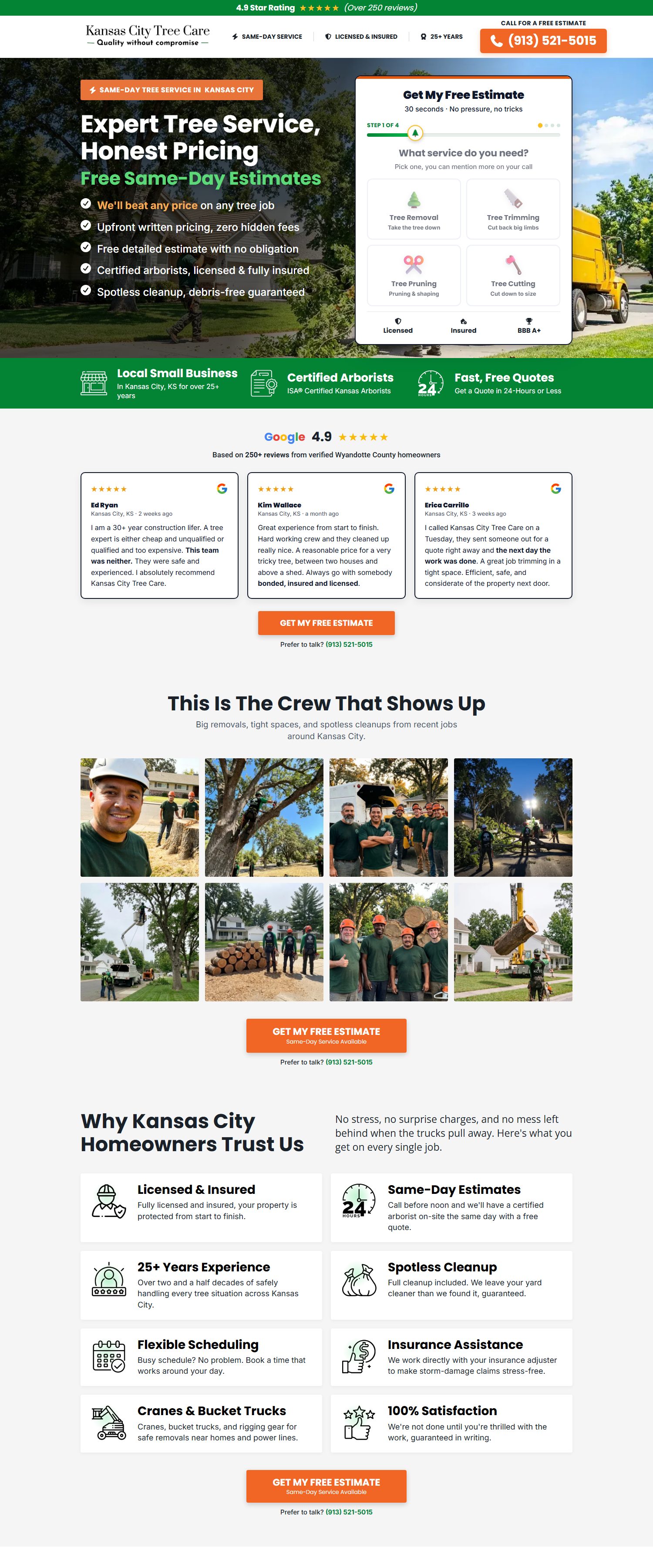
Every Google ad points to one address. A Worker sits in front of it, picks which version of the page to show, and swaps in the town from the ad.
| Live | lp.kctreecareks.net/?geo=Kansas-City (change geo to the town: Overland-Park, Olathe, and so on) |
|---|---|
| Cloudflare | Kansas City's own account. Worker hsd-ab-router answers on lp.kctreecareks.net |
| The two versions | kansas-city-lp-v1 and kansas-city-lp-v2. Right now BOTH slots point to v2 at 100%, so every visitor sees v2 and the A/B test is effectively off |
| Test results | The Worker reports visits to our Ads Manager dashboard under the test kansas-city-tree-service-test |
| Form | Posts to a GoHighLevel inbound webhook, which files it as a Google lead in their pipeline |
| Calls | A GoHighLevel number pool: each visitor sees their own tracking number, so every call is tied to the click |
| Tags | Google Tag Manager GTM-K7DMTKSJ, which holds the Google Ads tag AW-475057727 and nothing else |
| Google Ads | Account 251-330-4550. Every running ad points here. Paused ads still point to an old domain that no longer works, so fix them before turning any back on |
| Template | HSD Google Ads Manager/cloudflare-lp/ (README and AB-TESTING-GUIDE.md) |
Build one for a new client
Make the two versions
Version A is usually a copy of the page they already run; version B is the new page. Each one is a folder with an index.html, and each gets a data-test-id like <client>-tree-v1v2.
Run the deploy script
node "HSD Google Ads Manager/scripts/deploy-client.js" <slug> <account id> <token> checks the token, creates and deploys <slug>-lp-v1 and <slug>-lp-v2, deploys the Worker on lp.<their domain>, creates the test record in the dashboard, and checks both versions load.
Set the split
In the Worker's settings: ORIGIN_A, ORIGIN_B and SPLIT_PERCENT (50 for a real test). To force a version while checking, add ?variant=A or ?variant=B.
Connect the form
The form posts to a GoHighLevel inbound webhook. That workflow creates the contact and puts the card in "Google Leads".
Turn on call tracking
Set up a number pool in their GoHighLevel and add its script to the page, so the number on the page changes per visitor.
Add the tags
Google Tag Manager on the page with the Google Ads conversion tag. Add the Meta pixel in the same container (pixel guide), so Google visitors can be retargeted on Facebook.
Point the ads
Every ad's final URL becomes https://lp.<their domain>/?geo=<Town>, one per town or ad group.
Set up today, and not yet
Set up today
- Live page, town swap, form to GoHighLevel, call tracking: Kansas City
- Meta pixel: Not installed
- The page files: Not on David's computer; we need them in one known place
- A/B test: Both slots show v2, so nothing is being tested
- Claims on the page: "4.9 stars, over 250 reviews", "beat any price" and "BBB A+": check each one is true (the quiz page dropped "beat any price")
The Meta pixel: tag every visitor
The pixel tells Facebook who visited the client's pages and who became a lead. It makes the ads find more people like the leads, and it fills the retargeting audiences.
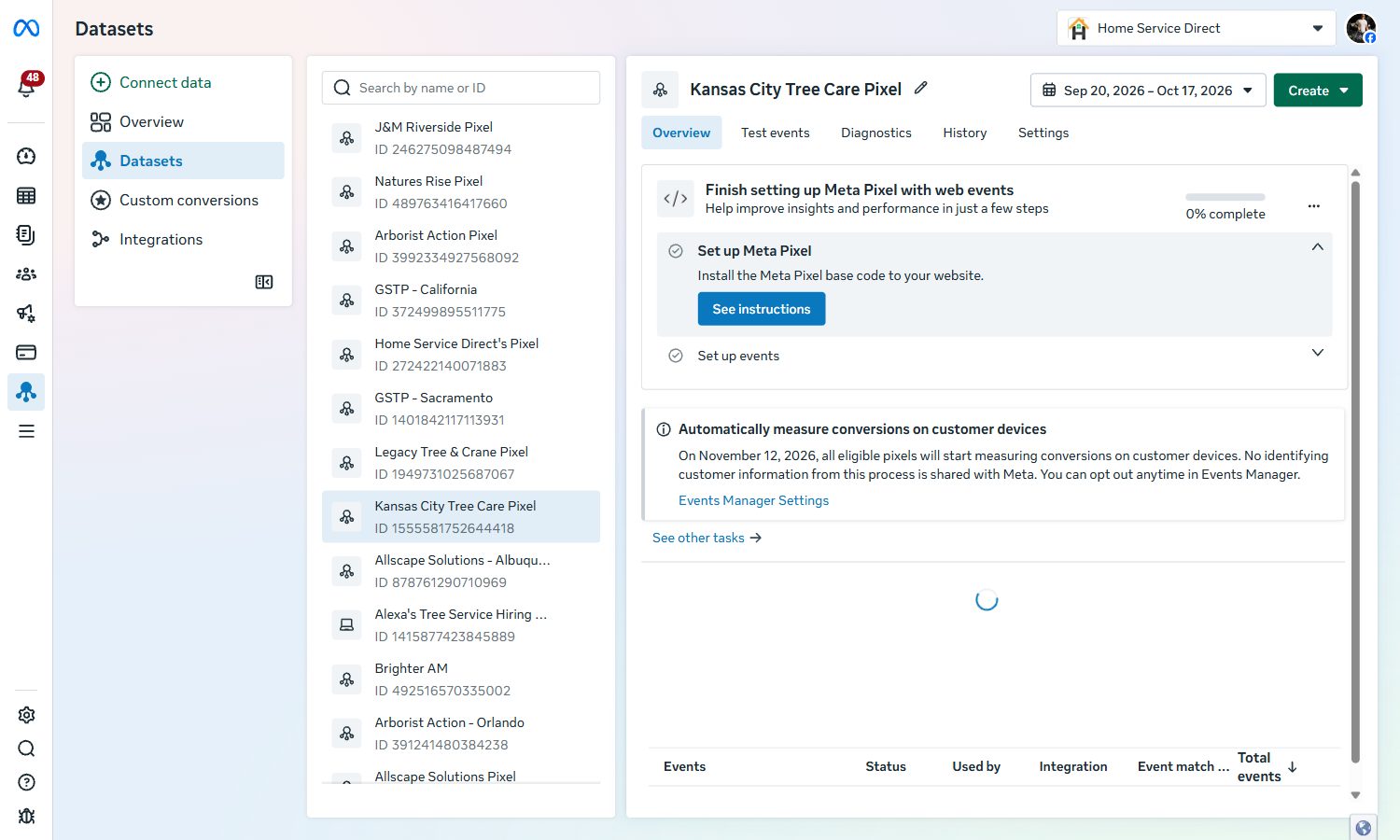
Where Kansas City's pixel is today
| Page | Pixel | Events |
|---|---|---|
| quote.kctreecareks.net (quiz) | Yes, added by the page's Worker; the ID is a secret, not in the page file | PageView, QuizStep on each answer, Lead on the thank-you page, plus Lead from our server (Conversions API) |
| lp.kctreecareks.net (Google) | No | Only the Google Ads tag |
| jobs.kctreecareks.net (hiring) | Yes | Same pixel, for the hiring ads |
Put it on the quiz page
Find the pixel ID
Events Manager > Data sources > the client's pixel. The ID is the long number under the name.
Make a Conversions API token
In the pixel's Settings, generate an access token for the Conversions API.
Save both as secrets
node _set-secrets.js with the pixel ID and the token, then redeploy. The Worker adds the pixel to every page and sends Lead from the server.
Test it in a real browser
Events Manager > Test events gives a test code. Save it as the META_TEST_EVENT_CODE secret, walk the quiz on your phone, and watch PageView, QuizStep and Lead arrive. Then delete the secret and redeploy.
Put it on the Google page (not done for Kansas City yet)
Open their Google Tag Manager
The container on the page is GTM-K7DMTKSJ. Use the login that owns it.
Add the pixel
New tag: the Meta Pixel base code with their pixel ID, firing on All Pages.
Add the lead event
A second tag that fires Lead when the form is sent (on the thank-you step or the form-sent trigger).
Publish and test
Publish the container, then use Test events in Events Manager and walk the Google page yourself.
Build audience 2
In their ad account: a website audience of people who visited lp.<their domain> and did not become a lead, 30 to 180 days, with the same ZIP filter.
Set up today, and not yet
Set up today
- Pixel and Conversions API on the quiz page: Kansas City
- Pixel on the hiring pages: Kansas City
- Pixel on the Google page: Not installed for Kansas City
- Test with a real browser on the quiz page: Not done yet: the test robot cannot fire the pixel
GoHighLevel: every lead, followed up
Every page, ad and call ends up in the client's GoHighLevel. The pipeline shows where each lead stands, and the follow-up texts go out without anyone touching them.
Kansas City's setup (read Oct 18)
| Pipeline | Columns |
|---|---|
| Leads Tracker & Sales Pipeline | New leads land by source: Facebook Leads, Google Leads, LSA Leads, Valpak Customers, Repeat & Referral Customers, KCTC Website. Then Appointment Scheduled, Estimate Given, Job Booked, Job Completed. Plus the ones that did not go ahead: Left VM, Estimate Given but Lost, Under Budget, Not Interested, Non-Responsive, Outside of Area, Spam, Do Not Contact, Waste of Time, Retarget |
| Google Review Campaign | Negative Review Received, Review Request Sent (Past Clients), Review Request Sent (New Clients), Review Link Clicked |
| Commercial Sales Pipeline | New commercial lead through to paid and closed |
Their own fields
- Type of Service, Project Timeline, Number of Trees, Tree Service Job Description (filled by the quiz page and the Facebook form)
- Ad Click ID and GA Conversion Sent Date (for sending results back to Google)
- Call Duration, Feedback
Their phone numbers
- Default Texting & Facebook Ads Mgmt: the number texts come from
- Google Ad extension: the number on the Google ads
- A number pool on the Google page, one number per visitor
- A test number
What happens to a Facebook lead today
The card is made
The lead lands in the "Facebook Leads" column with the tag fb form leads.
Text 1, within seconds
"Hi {first name}, this is Kansas City Tree Care. Thanks for reaching out for a free tree service quote in {city}!" followed by what they asked for: service, number of trees, timeline, details.
Text 2, right after
"We'll reach out shortly. Is this the best number to contact you?" After hours it says they will reach out once back in the office, and tags the contact "after working hours".
No reply after about 10 minutes
"Hey {first name}, did you get our text message?"
They reply
"Got it, our estimator will call you asap", with the office number and hours, then a request for photos of the tree.
The office calls
A person calls by hand and moves the card along: Appointment Scheduled, Estimate Given, Job Booked, Job Completed. Anyone who replies STOP is set to do not contact.
Read from their real contacts and conversations (12 recent Facebook leads, Oct 13). Our GoHighLevel key cannot open workflows, so the steps are what the customer received.
Set up a new client's GoHighLevel
Load our setup into their account
The same pipeline columns, fields, tags and follow-up texts as Kansas City.
Numbers
A texting number, a number for the Google ads, and a number pool for the Google page.
Private key
Settings > Private Integrations: make a key, then save it with their location ID in the LSA Command database. The pages and Client Command read it from there.
Connect Facebook lead forms and the pages
Facebook forms come in through the Facebook integration; the quiz page and the Google page send leads themselves.
Turn on the follow-up
The texts above, starting on each new lead's tag (Facebook form, quiz page and Google page).
Turn on the review machine
Review guide.
Set up today, and not yet
Set up today
- Pipelines, fields, numbers, follow-up texts: Kansas City
- Follow-up for quiz page leads: Their tag "fb quiz lead" does not start the follow-up yet
- Written list of the workflows: Our key cannot read workflows; someone signed in needs to record them
- Leads with no source: 178 leads in the last 30 days have no source set in the pipeline
The review machine: every job, a review ask
The office marks a job done, and the customer gets a review text with a link straight to the client's Google profile. Nobody has to remember to ask.
The office moves the card to Job Completed
In the Leads Tracker & Sales Pipeline.
GoHighLevel sends the review text
The card appears in the Google Review Campaign pipeline under "Review Request Sent (New Clients)". There is a separate column for past customers sent in a batch.
They tap the link
The card moves to "Review Link Clicked", and the link opens their Google profile to leave a review.
A bad experience
The pipeline has a "Negative Review Received" column and the contact has a Feedback field, so unhappy customers can be caught before Google.
It shows up in Client Command
The Reviews page counts jobs done, texts sent and links opened, and pulls their Google rating and newest reviews every morning.
Set it up for a new client
Build the review pipeline
Same columns as Kansas City's Google Review Campaign.
The review workflow
Starts when a card reaches Job Completed: send the review text with their Google review link, move the card, and move it again when the link is clicked.
Pick the right Google profile
If they have more than one, decide which one gets the reviews, and use that profile's review link.
Show it in Client Command
Find the profile's place ID with node seo-dashboard/scripts/find-gbp.js "<name>", then node ppl-command/scripts/set-reviews.cjs <slug> --place=<id> --label="<town>" --requests. It finds the review pipeline by itself.
Set up today, and not yet
Set up today
- Review texts after every job, review pipeline, reviews in Client Command: Kansas City
- Past-customer batch: No past customers have been sent a request in the last 30 days
- Reviews page in Client Command for other clients: Built, switched off
Client Command: set up their report
One report the client opens on their phone, with every channel, every lead and their reviews, pulled from the platforms themselves so the numbers match what Google and Facebook show. Anyone on the team can set it up from their own computer: Claude Code does the work from the runbook in GitHub, and every step runs on our Client Command server.
One-time setup on your computer
Accept the GitHub invite
GitHub emails it: home-service-direct/app-client-command. Burcu is invited (write access).
Install three things
Node.js (the LTS version, nodejs.org), Git (git-scm.com) and Claude Code.
Get the code
In a terminal: git clone https://github.com/home-service-direct/app-client-command.git then cd app-client-command. Nothing else to install.
Add your setup key
David sends it through the password manager. Make a file named .env in the app-client-command folder with that one line (SETUP_KEY=...). It never goes to GitHub.
Check it
node setup.cjs whoami should say "Your key works." Before each new client, run git pull to get the newest runbook.
Then, for each client, this prompt
Open Claude Code in your app-client-command folder. Copy the prompt, fill in the brackets, paste it in. Claude reads the runbook, runs every step on the server, and stops to ask before anything the client will see.
Set up Client Command reporting for [BUSINESS NAME]. This is a [NEW / EXISTING] client.
Read CLIENT-SETUP.md first and follow it step by step. Run every step with node setup.cjs.
What I have: [GoHighLevel location ID, Google Ads ID, Facebook ad account, Local Services ID, Google profile name, website, the emails that log in: whatever you have].
Stop and ask me before anything in the "Ask first" list. Show me the checklist when you are done.
To see where any client stands first, the same prompt works with "This is an EXISTING client". Claude runs the checklist and does only what is missing.
Where it all lives
| The runbook | GitHub app-client-command / CLIENT-SETUP.md (a copy is in skills-lsa) |
|---|---|
| The code | GitHub home-service-direct/app-client-command (private) |
| The checklist | node setup.cjs client-setup <slug>: what is connected, how fresh, what is missing, and the command for each missing piece. With no slug it lists every client |
| How your computer does it | node setup.cjs <step> sends the step to the Client Command server with your setup key. The server runs it: only the listed setup steps, logged with your name. David can switch a key off any time |
| The database | Supabase project fllshykllhdxbgcznnfl (the Client Command one, not LSA Command). Every client is one row |
| The server | Hostinger VPS, /opt/ppl-command. Holds every key and runs every sync. Setting up a client changes data only, so nothing needs deploying |
| Keys and passwords | On the server only. Your computer holds just your setup key. Never in GitHub, chat or a doc |
| See it as the client | node setup.cjs preview <slug> opens the read-only preview in your browser (a one-time link) |
| Client login | clients.homeservicedirect.net/portal/. Password is always <slug><year>, for example treex2026 |
| How fresh | Leads and calls every 10 minutes, new pipeline cards every 2 minutes, ad spend, Google reviews, website and Google profile numbers every morning. All on the server |
Before you start, collect
- Business name and a short slug (lowercase letters, digits and dashes; never changes)
- GoHighLevel location ID and a private key (below)
- Google Ads customer ID, if they run Google Ads
- Facebook ad account ID, if they run Facebook ads
- Local Services customer ID, if they run it
- Google Business Profile name (and town, if they have two)
- Website address (Search Console and Analytics under seo@homeservicedirect.net)
- The emails that will log in
Missing pieces just stay off. The checklist shows them.
The GoHighLevel private key
- In the client's sub-account: Settings, Private Integrations, Create
- Name it "Client Command"
- View and edit: Conversations, Conversation Messages, Contacts, Opportunities
- View: Locations, Custom Fields
- Copy the key once (GoHighLevel never shows it again) and paste it only into the command Claude gives you
What Claude does, step by step
Create the client
New clients only. Set up as reported on, never invoiced. Pay-per-lead clients are billed, so those go to David.
Connect their GoHighLevel
Saves the key (encrypted), then picks the pipeline that holds their leads and checks every column means the right thing.
Connect the ad accounts
Google Ads, Facebook and Local Services, only the ones they run. Every account gets its own card. Leads with no spend means a missing connection.
Reviews and the Google profile
Finds their profile, marks the one their review texts go to, and pulls their rating and reviews.
Website numbers
Search Console and Analytics. Google sends these 2 to 5 days late, and a new Analytics shows "Counting" for a day or two.
Look at it as the client
The read-only preview, on a computer and a phone. Every number should match the platform it comes from.
Switch it on and give them a login
Only with David's OK. Switches on the pages that are connected, opens the portal, and creates the login.
Ask David first
- Switching a page on, opening the portal, or making a login
- A pay-per-lead client
- Any error, or two numbers that disagree
- Any change to the code
Never
- Send a test text or add a test lead: their GoHighLevel texts real people
- Open a client's messages logged in as them: it marks them read on their side
- Paste a key or password into chat, a doc, Slack or GitHub
- Show a pay-per-lead client what we paid for their leads
Set up today, and not yet
Set up today
- Overview, Sales, Reviews, Leads, Messages and every channel: Kansas City
- Website and Google profile pages: Ready for TreeEx in preview
- Setup from your own computer: Runbook, code and setup tool in GitHub; Burcu invited and her key issued
- Website and Google profile pages for Kansas City: Switched off; website not linked
- Reports for the other clients: Built, mostly switched off
- Website-only clients ($299 offer): The report still starts with the ads pages; a website-first version is not built yet
Client Studio: hand off finished videos
Every finished client video goes into the Client Studio, in two sizes: 4:5 for Facebook and 9:16 for YouTube. It is where the Facebook ads team and Marko (Google Ads) pick up a video, copy its ad name and text, download it, and upload it. You run it from your own computer with Claude Code, and you can change anything in it.
First time on your computer
What you need once
- Claude Code on your computer
- Node and ffmpeg installed (Claude installs them if they are missing)
- Access to the GitHub repo
app-hsd-client-studio: David adds you - The keys file (
.env): David sends the values privately, never by email, Slack or chat - Google Drive for desktop, signed in, with a shortcut to
⭐HSD Client Marketing⭐added to My Drive
Then paste this once
Set up the HSD Client Studio on this computer.
Clone github.com/home-service-direct/app-hsd-client-studio into my Documents folder,
then follow "First time on a computer" in its CLAUDE.md.
I will paste the .env values when you ask. Tell me when the check passes.
Publish videos with this prompt
Open Claude Code in your app-hsd-client-studio folder. Copy the prompt, fill in the brackets, paste it in. Claude reads the runbook, publishes both sizes, checks them live and copies them to the client's Drive folder.
Publish the finished videos for [CLIENT NAME] to the Client Studio.
Read PUBLISH.md first and follow it step by step.
The videos: [file names or the folder they are in, 4:5 and 9:16]. David approved: [YES / NOT YET].
Put copies in the client's Video Ads folder in HSD Client Marketing too.
Show me the cards and the links when you are done.
To change the studio itself (a new column, a new button, a fix), say what you want and add "Read CLAUDE.md first". Claude edits it, deploys it, checks it at computer and phone size, and saves it to GitHub.
Where it all lives
| The studio | hsd-client-studio.pages.dev. One login for the whole team: marketing@homeservicedirect.net. The password is in your .env |
|---|---|
| The code | GitHub home-service-direct/app-hsd-client-studio (private). Your copy: the folder you cloned it into |
| The runbooks | PUBLISH.md (publishing videos) and CLAUDE.md (setting up, changing the site, deploying) |
| Hosting | Cloudflare: Pages hsd-client-studio, database hsd-client-studio, video storage hsd-client-videos. Always on |
| The video list | One file per client in manifests/, for example manifests/kansas-city-tree-care.json. Each video: ad name, angle, size, script, notes, column |
| Team copies | Google Drive ⭐HSD Client Marketing⭐ > Tree Service Niche > Ads Mgmt > the client > Video Ads, with Facebook 4x5 and YouTube 9x16 inside |
| Where videos are made | The HSD Video Studio, GitHub app-video-studio. Finished files come out of there and go in here |
| Keys and passwords | In .env in your copy only. Never in GitHub, chat, a doc or Slack |
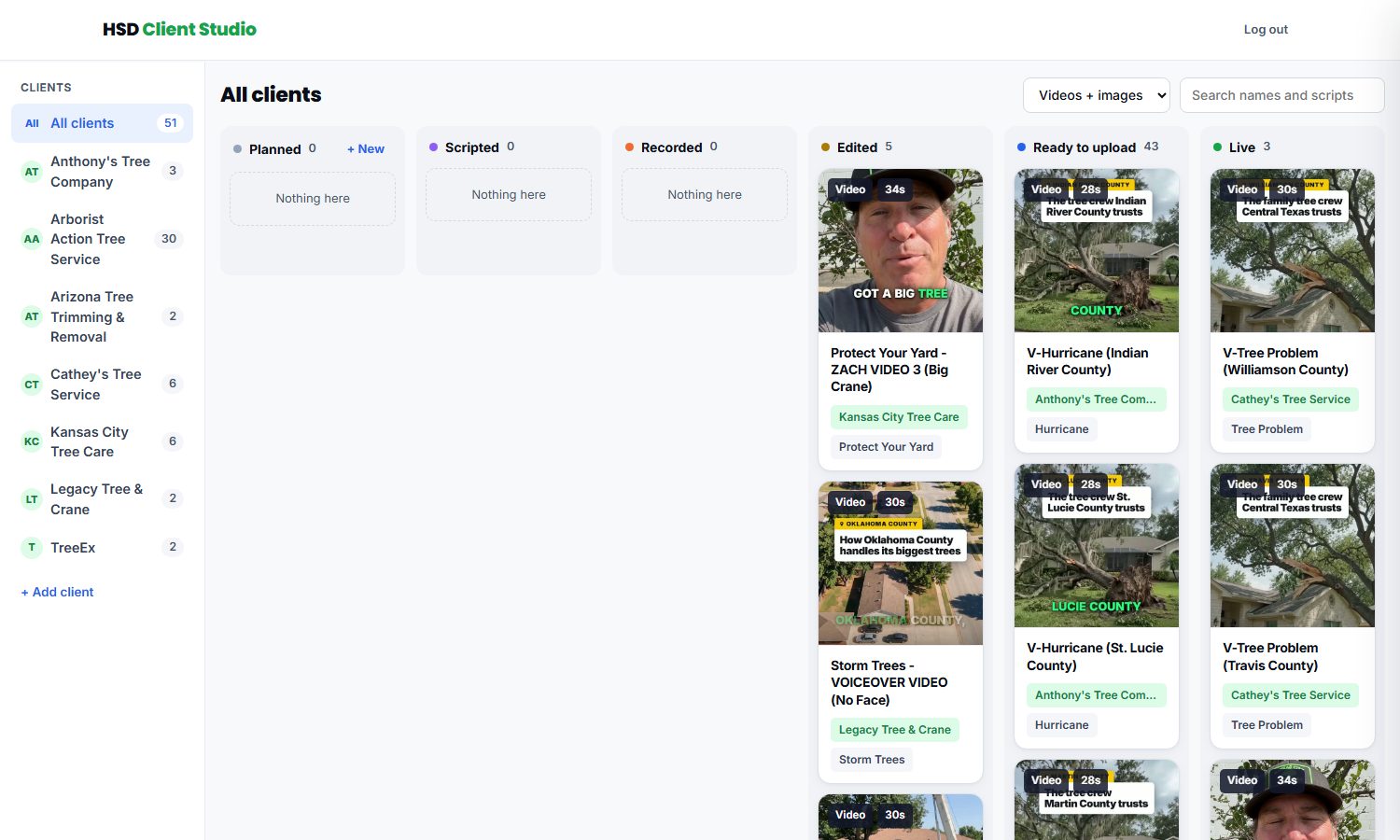
The six columns
- Planned: an idea. Add one with + New
- Scripted: the words are written
- Recorded: footage is in
- Edited: cut, but David has not approved it. Do not upload
- Ready to upload: approved. Take it from here
- Live: running in the ad account
Sizes and names
Every video has two cards: 4:5 for Facebook and Instagram feed, 9:16 for YouTube and Reels. Names match the ad in Ads Manager: Angle - CREATIVE (Concept), and the 9:16 card adds - 9x16.
- Clean Yard - ZACH VIDEO 1 (Big Crane)
- Clean Yard - ZACH VIDEO 1 (Big Crane) - 9x16
- Storm Trees - VOICEOVER VIDEO (No Face)
What Claude does, step by step
Finds the client
Opens the client's file in manifests, or starts one for a new client.
Adds each video, both sizes
Ad name, angle, size, the script, a note for the uploader, and the column: Ready to upload if David approved it, Edited if not.
Publishes
Makes the thumbnail, uploads the video and writes the card. Publishing an existing video again swaps the file and keeps whatever the team changed.
Checks the colors
Every file must play with the right colors in Chrome and on phones.
Checks it live
Every card is on the board and every video plays and downloads from the site.
Copies to Drive
Into the client's Video Ads folder: 4:5 in Facebook 4x5, 9:16 in YouTube 9x16, named like the card.
Reports back
Which cards went in, which column, the studio link and the Drive folder.
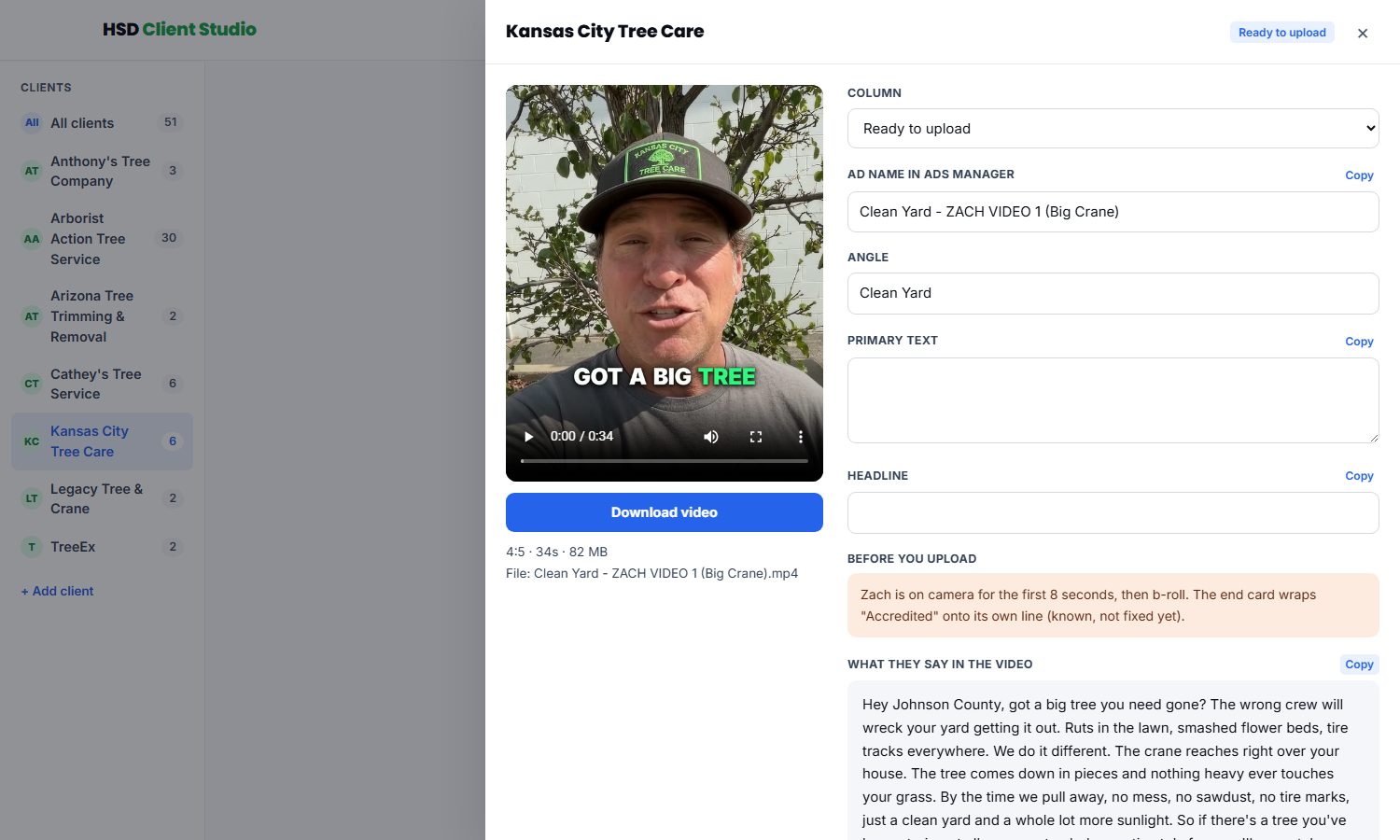
For the person uploading
- Take videos from Ready to upload only
- Facebook gets the 4:5 card, YouTube gets the 9:16 card
- Read Before you upload on the card first
- Use Copy next to the ad name so it matches the board
- Move the card to Live once it is running
Ask David first
- Putting a video he has not approved in Ready to upload
- Deleting a card or a client
Never
- Upload a video from Edited: David has not approved it
- Put HSD's own ads or founder videos in here: client ads only
- Paste the password or a key into chat, a doc, Slack or GitHub
- Add a claim the client has not confirmed (licensed, insured, star rating, years)
Set up today, and not yet
Set up today
- Client Studio live with 7 clients: Kansas City, Legacy, Arizona Tree Trimming, Anthony's, Arborist Action, Cathey's, TreeEx
- Both sizes: Kansas City and Legacy have 4:5 and 9:16 cards, and both sizes in their Drive Video Ads folders
- Runs from any computer: Code, runbooks and keys template in GitHub app-hsd-client-studio
- Her computer set up: Needs GitHub access and the keys from David, then the set up prompt
- 9:16 for the other clients: Arizona, Anthony's, Arborist Action, Cathey's and TreeEx have 4:5 only so far
- A login per person: One shared login for now, by David's call
What is not set up yet
Everything below was found by looking at what is really set up, on Oct 18. Kansas City first, because that is the test.
| Piece | Where it stands (checked Oct 18) | What it unlocks |
|---|---|---|
| Ads pointing at the quiz page | None. All 11 active Kansas City ads use Facebook lead forms | The test itself |
| Follow-up texts for quiz leads | Quiz leads get the tag "fb quiz lead", which does not start the follow-up. The thank-you page promises a text | Must be on before ads point at the page |
| Meta pixel on the Google page | Not installed on lp.kctreecareks.net (Google Ads tag only) | Google visitors retargeted on Facebook |
| Pixel tested in a real browser | The quiz page's pixel has not been checked with Test events yet | Proof Facebook gets every Lead |
| One true review number | Quiz page: 4.7, 280+. Google page: 4.9, over 250. Google: 4.9 on 69 (Overland Park), 4.4 on 292 (Merriam Lane) | Every claim literally true |
| Google page files in one known place | v2 was uploaded by hand Oct 15 and 16; the files are not on David's computer | Anyone can edit and redeploy it |
| A real A/B test on the Google page | Both slots show v2 | Knowing which page gets more calls |
| Old quiz copy taken down | kctc-tree-lp.pages.dev still loads and drops every lead | No lost leads if someone finds it |
| The five retargeting audiences | Not built for any client | Campaign 2 |
| Retargeting campaign | Not running for any client | The jobs from people who did not call the first time |
| Organic boost campaign | Not running for any client | Audience 4 grows; the town knows their name |
| Own landing page for every client | Only Kansas City has one; every other client uses Facebook's lead form | Fewer junk leads, and something to put the pixel on |
| Book-a-call page | Mockup only | A booked estimate time, not just a name and number |
| Website and Google profile pages for Kansas City | Built in Client Command, switched off; website not linked | The client sees what their website and Google profile bring in |
| Video ads for every client | 6 clients so far | Bigger jobs from people who saw the real crew |
| Client Command report for every client | Only Kansas City has the full report on | Proof of what we brought in, for every client |
How these were checked: live pages fetched and their scripts read; Cloudflare, GoHighLevel and Meta read through their APIs (read only); Client Command opened in preview. Nothing was submitted or changed.